本文将介绍怎样处理在 mysql 中创建函数时提示 “1418 - This function has none of DETERMNISTIC, NO SOL,or READS SOL DATA in its declaration and binary logging is enabled (you might" want to use the less safe log_bin_trust_function_creators variable)”错误。
环境
windows 10
mysql 5.7
问题场景
在 mysql 中创建函数 function,抛出如下错误:
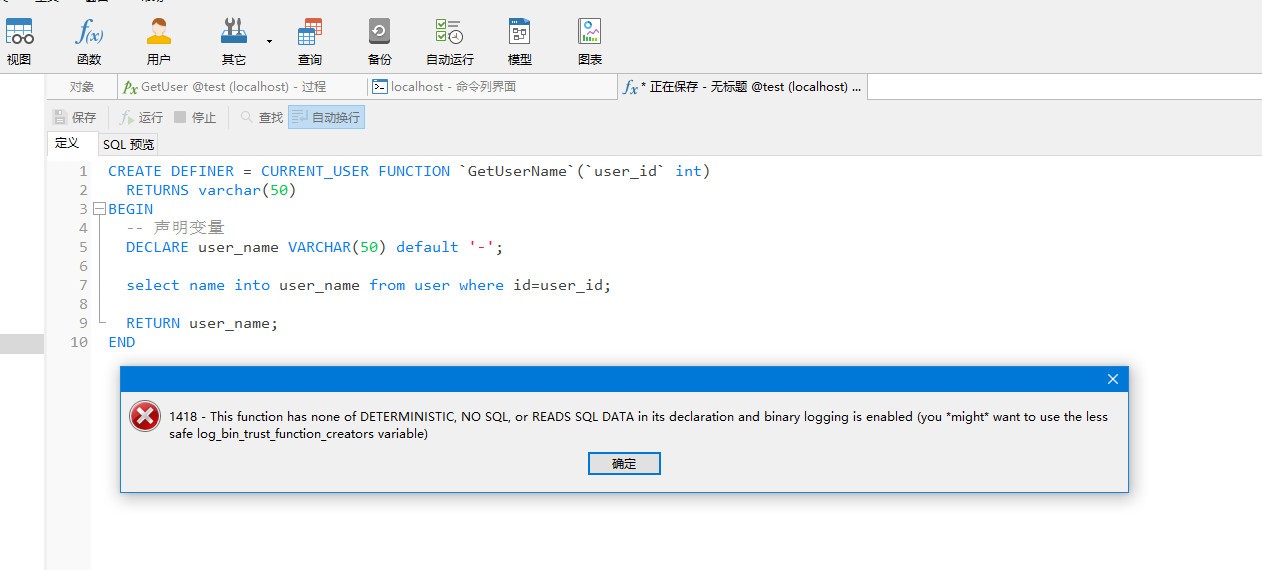
将上面错误原因机器翻译后:
“1418 - 此函数的声明中没有 DETERMNISTIC、NO SOL 或 READS SOL DATA,并且启用了二进制日志记录(您可能希望使用安全性较低的 log_bin_trust_function_creators 变量)”
mysql广告位
那么什么是 log_bin_trust_function_creators 呢?
log_bin_trust_function_creators 是 MySQL 的一个系统变量,用于控制是否信任非特权用户创建的函数和存储过程。
当 log_bin_trust_function_creators 的值为 0(FALSE)时,默认情况下,MySQL 会拒绝非特权用户创建函数和存储过程。这是为了防止潜在的安全风险,因为函数和存储过程可以包含任意的 SQL 代码,并且可能对数据库产生不良影响。
当 log_bin_trust_function_creators 的值为 1(TRUE)时,MySQL 允许非特权用户创建函数和存储过程。这意味着这些用户可以在数据库中执行自己编写的函数和存储过程,但仍然受到权限限制。
注意:修改 log_bin_trust_function_creators 的值需要具有 SUPER 权限。此外,如果启用了二进制日志(binary logging),则修改 log_bin_trust_function_creators 的值会导致重新启动二进制日志。
总的来说,log_bin_trust_function_creators 的值为 0 时,MySQL 不信任非特权用户创建的函数和存储过程;值为 1 时,MySQL允许非特权用户创建函数和存储过程。在设置此值时需要谨慎考虑安全性和权限管理的问题。
解决方案
临时解决
重启 MySQL 数据库后将失效,执行如下命令:
set global log_bin_trust_function_creators=TRUE;
永久解决
通过修改 my.cnf 配置文件解决,在配置文件 my.cnf 的 [mysqld] 下添加 log_bin_trust_function_creators=1 配置,如下:
# For advice on how to change settings please see
# http://dev.mysql.com/doc/refman/8.0.13/en/server-configuration-defaults.html
# *** DO NOT EDIT THIS FILE. It's a template which will be copied to the
# *** default location during install, and will be replaced if you
# *** upgrade to a newer version of MySQL.

[mysql]
default-character-set=utf8

[mysqld]
# 看这里
log_bin_trust_function_creators=1

# Remove leading # and set to the amount of RAM for the most important data
# cache in MySQL. Start at 70% of total RAM for dedicated server, else 10%.
# innodb_buffer_pool_size = 128M

# Remove leading # to turn on a very important data integrity option: logging
# changes to the binary log between backups.
# log_bin







 川公网安备51010802032098