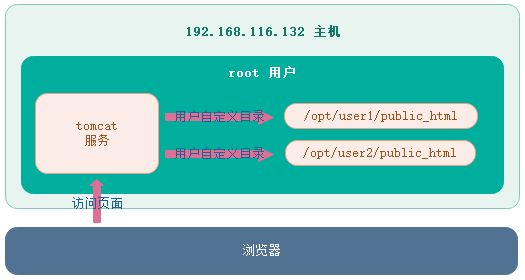
上章节介绍了在 Linux 中,通过在 user1 和 user2 主目录下面创建 public_html 目录实现自定义用户目录。本章节将介绍在安装 tomcat 服务的用户的指定目录下面根据用户名创建 /opt/user1/public_html 和 /opt/user2/public_html 目录,将两个目录作为用户 user1 和 user2 的 tomcat 自定义用户目录。如下图:
环境
Tomcat版本:apache-tomcat-7.0.64
JDK版本:jdk-7u80-linux-x64
Linux版本:CentOS Stream 9
具体步骤
创建 public_html 目录
登录 root 用户,分别为用户 user1 和 user2 创建 /opt/user1/public_html 和 /opt/user2/public_html 两个目录,命令如下:
[root@localhost ~]# mkdir -p /opt/user1/public_html
[root@localhost ~]# mkdir -p /opt/user2/public_html
当目录创建好了后,分别在 user1 和 user2 的 public_html 目录下面创建 index.html 文件,内容如下:
# /opt/user1/public_html/index.html
<html>
<head>
    <meta charset="UTF-8">
    <meta http-equiv="X-UA-Compatible" content="IE=edge">
    <meta name="viewport" content="width=device-width, initial-scale=1.0">
    <title>USER1 - HOME</title>
</head>
<body>
    <h1>USER1 HOME /opt/user1/public_html</h1>
</body>
</html>

# /opt/user2/public_html/index.html
<html>
<head>
    <meta charset="UTF-8">
    <meta http-equiv="X-UA-Compatible" content="IE=edge">
    <meta name="viewport" content="width=device-width, initial-scale=1.0">
    <title>USER1 - HOME</title>
</head>
<body>
    <h1>USER1 HOME /opt/user2/public_html</h1>
</body>
</html>
搭建环境
登录 root 账号,将 JDK 和 Tomcat 安装包上传到根目录。然后安装 JDK、Tomcat,如果不清楚怎样安装,请参考“Linux 安装 JDK” 和 “Linux 安装 Tomcat”。
tomcat广告位
配置 server.xml
使用 CD 进入到 Tomcat 的 CATALINA_HOME/conf 目录。使用 vim 编辑 server.xml 文件,在 <host> 标签中添加如下配置:
<Host name="localhost"  appBase="webapps"
            unpackWARs="true" autoDeploy="true">
    <Listener className="org.apache.catalina.startup.UserConfig"
        directoryName="public_html"
        homeBase="/opt"
        userClass="org.apache.catalina.startup.HomesUserDatabase" />
    <!-- ... -->
</Host>
启动 Tomcat
在 Tomcat 的 CATALINA_HOME 主目录打开终端,执行下面命令启动 Tomcat。如下:
[root@localhost apache-tomcat-7.0.64]# ./bin/startup.sh ; tail -f logs/catalina.out
验证效果
打开浏览器,访问 http://localhost:8080/~user1/ 地址,如下图:

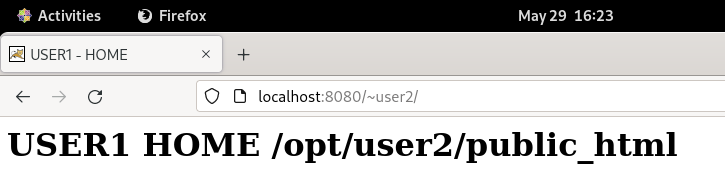
继续访问 http://localhost:8080/~user2/ 地址,如下图:


 川公网安备51010802032098