wsgen.exe 是 JDK 中用于生成 JAX-WS(XML Web Services 的 Java API)相关文件的命令行工具。它读取 Web Service 的终端类文件,并生成用于发布 Web Service 所需的源代码文件、经过编译的二进制类文件、异常 Bean 以及 WSDL(Web Services Description Language)和相关的 XSD 文件。
命令语法
WSGEN [options] <SEI>
命令选项
其中 [options] 包括:
-classpath <path> 指定查找输入类文件的位置
-cp <path> 与 -classpath <path> 相同
-d <directory> 指定放置生成的输出文件的位置
-encoding <encoding> 指定由源文件使用的字符编码
-extension 允许供应商扩展 - 不按规范指定功能。使用扩展可能会导致应用程序不可移植或无法与其他实现进行互操作
-help 显示帮助
-keep 保留生成的文件
-r <directory> 资源目标目录, 指定放置资源文件 (例如 WSDL) 的位置
-s <directory> 指定放置生成的源文件的位置
-verbose 有关编译器在执行什么操作的输出消息
-version 输出版本信息
-wsdl[:protocol] 生成 WSDL 文件。协议是可选的。有效协议是[soap1.1, Xsoap1.2],默认值为 soap1.1。非标准协议[Xsoap1.2]只能与-extension 选项结合使用。
-inlineSchemas 生成的 wsdl 中的内嵌模式。必须与 -wsdl 选项结合使用。
-servicename <name> 指定要用在生成的 WSDL 中的服务名与 -wsdl 选项结合使用。
-portname <name> 指定要用在生成的 WSDL 中的端口名与 -wsdl 选项结合使用。
扩展选项:
java 广告位
命令示例
(1)根据指定的 Java 代码生成 JAX-WS 相关代码,如果你存在 WsService 类,代码如下:
import javax.jws.WebService;

@WebService(targetNamespace = "http://example.com/hello-world", name = "HelloWorldService")
public class WsService {

    public String sayHello(String name) {
        return "Hello, " + name + "!";
    }

}
执行如下命令:
# 编译 java 文件
D:\share_dir\ShareDoc> javac WsService.java

# 生成 JAX-WS
D:\share_dir\ShareDoc> wsgen -cp . WsService
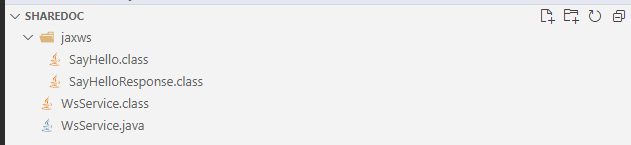
上述命令执行成功后将在当前目录下面创建 jaxws 目录,如下图:
使用反编译工具反编译 SayHello.class 和 SayHelloResponse.class 字节码文件,它们内容分别如下:
SayHello.class
// Source code is decompiled from a .class file using FernFlower decompiler.
package jaxws;

import javax.xml.bind.annotation.XmlAccessType;
import javax.xml.bind.annotation.XmlAccessorType;
import javax.xml.bind.annotation.XmlElement;
import javax.xml.bind.annotation.XmlRootElement;
import javax.xml.bind.annotation.XmlType;

@XmlRootElement(
   name = "sayHello",
   namespace = "http://example.com/hello-world"
)
@XmlAccessorType(XmlAccessType.FIELD)
@XmlType(
   name = "sayHello",
   namespace = "http://example.com/hello-world"
)
public class SayHello {
   @XmlElement(
      name = "arg0",
      namespace = ""
   )
   private String arg0;

   public SayHello() {
   }

   public String getArg0() {
      return this.arg0;
   }

   public void setArg0(String var1) {
      this.arg0 = var1;
   }
}
SayHelloResponse.class
// Source code is decompiled from a .class file using FernFlower decompiler.
package jaxws;

import javax.xml.bind.annotation.XmlAccessType;
import javax.xml.bind.annotation.XmlAccessorType;
import javax.xml.bind.annotation.XmlElement;
import javax.xml.bind.annotation.XmlRootElement;
import javax.xml.bind.annotation.XmlType;

@XmlRootElement(
   name = "sayHelloResponse",
   namespace = "http://example.com/hello-world"
)
@XmlAccessorType(XmlAccessType.FIELD)
@XmlType(
   name = "sayHelloResponse",
   namespace = "http://example.com/hello-world"
)
public class SayHelloResponse {
   @XmlElement(
      name = "return",
      namespace = ""
   )
   private String _return;

   public SayHelloResponse() {
   }

   public String getReturn() {
      return this._return;
   }

   public void setReturn(String var1) {
      this._return = var1;
   }
}
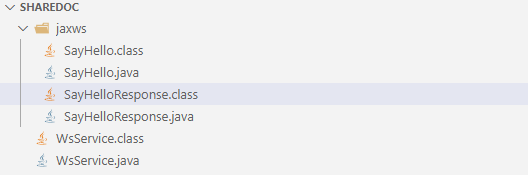
(2)使用 -keep 选项保留生成的 class 和 java 文件,命令如下:
D:\share_dir\ShareDoc> wsgen -cp . -keep WsService
执行成功后,结果如下图:


 川公网安备51010802032098