场景介绍
假如我们有一个项目,该项目有两个服务 service1 和 service2,下面通过 Spring Cloud Alibaba 来实现这两个服务,并且通过 Nacos 管理他们的配置。如下图:

配置 Nacos
在 Nacos 的 dev 命名空间下面创建 service1.yaml 和 service2.yaml 两个配置集,如下图:

其中,service1.yaml 配置集内容如下:
name: service1
service2.yaml 配置集内容如下:
name: service2
nacos 广告位
创建项目
使用 IDEA 创建一个项目,项目结构如下图:

其中,nacos_spring_cloud3 是一个 pom 项目,该项目依赖如下:
<?xml version="1.0" encoding="UTF-8"?>
<project xmlns="http://maven.apache.org/POM/4.0.0"
        xmlns:xsi="http://www.w3.org/2001/XMLSchema-instance"
        xsi:schemaLocation="http://maven.apache.org/POM/4.0.0 http://maven.apache.org/xsd/maven-4.0.0.xsd">
   <modelVersion>4.0.0</modelVersion>
   <parent>
       <groupId>com.hxstrive.nacos</groupId>
       <artifactId>springcloud_alibaba_nacos</artifactId>
       <version>1.0-SNAPSHOT</version>
   </parent>
   <artifactId>nacos_spring_cloud3</artifactId>
   <name>nacos_spring_cloud3</name>
   <packaging>pom</packaging>

   <modules>
       <module>service1</module>
       <module>service2</module>
   </modules>

   <properties>
       <project.build.sourceEncoding>UTF-8</project.build.sourceEncoding>
       <maven.compiler.source>1.8</maven.compiler.source>
       <maven.compiler.target>1.8</maven.compiler.target>
   </properties>

   <dependencyManagement>
       <dependencies>
           <dependency>
               <groupId>com.alibaba.cloud</groupId>
               <artifactId>spring-cloud-alibaba-dependencies</artifactId>
               <version>2.1.2.RELEASE</version>
               <type>pom</type>
               <scope>import</scope>
           </dependency>
           <!-- https://mvnrepository.com/artifact/org.springframework.cloud/spring-cloud-dependencies -->
           <dependency>
               <groupId>org.springframework.cloud</groupId>
               <artifactId>spring-cloud-dependencies</artifactId>
               <version>Greenwich.RELEASE</version>
               <type>pom</type>
               <scope>import</scope>
           </dependency>
           <!-- https://mvnrepository.com/artifact/org.springframework.boot/spring-boot-dependencies -->
           <dependency>
               <groupId>org.springframework.boot</groupId>
               <artifactId>spring-boot-dependencies</artifactId>
               <version>2.1.3.RELEASE</version>
               <type>pom</type>
               <scope>import</scope>
           </dependency>
       </dependencies>
   </dependencyManagement>

   <build>
       <plugins>
           <plugin>
               <groupId>org.springframework.boot</groupId>
               <artifactId>spring-boot-maven-plugin</artifactId>
           </plugin>
       </plugins>
   </build>
</project>
service1 服务
服务依赖如下:
<?xml version="1.0" encoding="UTF-8"?>
<project xmlns="http://maven.apache.org/POM/4.0.0"
        xmlns:xsi="http://www.w3.org/2001/XMLSchema-instance"
        xsi:schemaLocation="http://maven.apache.org/POM/4.0.0 http://maven.apache.org/xsd/maven-4.0.0.xsd">
   <modelVersion>4.0.0</modelVersion>
   <parent>
       <groupId>com.hxstrive.nacos</groupId>
       <artifactId>nacos_spring_cloud3</artifactId>
       <version>1.0-SNAPSHOT</version>
   </parent>
   <artifactId>service1</artifactId>
   <name>service1</name>

   <dependencies>
       <!-- Spring Boot Begin -->
       <dependency>
           <groupId>org.springframework.boot</groupId>
           <artifactId>spring-boot-starter-web</artifactId>
       </dependency>
       <dependency>
           <groupId>org.springframework.boot</groupId>
           <artifactId>spring-boot-starter-actuator</artifactId>
       </dependency>
       <dependency>
           <groupId>org.springframework.boot</groupId>
           <artifactId>spring-boot-starter-test</artifactId>
           <scope>test</scope>
       </dependency>
       <!-- Spring Boot End -->

       <!-- Spring Cloud Begin -->
       <dependency>
           <groupId>com.alibaba.cloud</groupId>
           <artifactId>spring-cloud-starter-alibaba-nacos-config</artifactId>
       </dependency>
       <!-- Spring Cloud End -->
   </dependencies>

</project>
服务配置如下:
server:
 port: 8081

spring:
 application:
   name: service1
 cloud:
   nacos:
     config:
       # Nacos 服务地址
       server-addr: 127.0.0.1:8848
       # Nacos 配置文件扩展名
       file-extension: yaml
       # Nacos 命名空间ID
       namespace: 8719efd1-94a6-49f7-9846-2debd66f6c0f
       # Nacos 分组
       group: DEFAULT_GROUP
       # Nacos 登录账号
       username: nacos
       # Nacos 登录密码
       password: nacos
服务启动类代码:
package com.hxstrive.nacos;

import org.springframework.beans.factory.annotation.Value;
import org.springframework.boot.SpringApplication;
import org.springframework.boot.autoconfigure.SpringBootApplication;
import org.springframework.cloud.context.config.annotation.RefreshScope;
import org.springframework.web.bind.annotation.GetMapping;
import org.springframework.web.bind.annotation.RequestMapping;
import org.springframework.web.bind.annotation.RestController;

/**
* 入口类
* @author hxstrive.com
*/
@SpringBootApplication
@RestController
@RequestMapping("/config")
@RefreshScope
public class BootstrapApp {

   public static void main(String[] args) {
       SpringApplication.run(BootstrapApp.class, args);
   }

   @Value("${name}")
   private String name;

   @GetMapping("/get")
   public String get() {
       return toString();
   }

   @Override
   public String toString() {
       return "BootstrapApp{" +
               "name='" + name + '\'' +
               '}';
   }
}
service2 服务
服务依赖如下:
<?xml version="1.0" encoding="UTF-8"?>
<project xmlns="http://maven.apache.org/POM/4.0.0"
        xmlns:xsi="http://www.w3.org/2001/XMLSchema-instance"
        xsi:schemaLocation="http://maven.apache.org/POM/4.0.0 http://maven.apache.org/xsd/maven-4.0.0.xsd">
   <modelVersion>4.0.0</modelVersion>
   <parent>
       <groupId>com.hxstrive.nacos</groupId>
       <artifactId>nacos_spring_cloud3</artifactId>
       <version>1.0-SNAPSHOT</version>
   </parent>
   <artifactId>service2</artifactId>
   <name>service2</name>

   <dependencies>
       <!-- Spring Boot Begin -->
       <dependency>
           <groupId>org.springframework.boot</groupId>
           <artifactId>spring-boot-starter-web</artifactId>
       </dependency>
       <dependency>
           <groupId>org.springframework.boot</groupId>
           <artifactId>spring-boot-starter-actuator</artifactId>
       </dependency>
       <dependency>
           <groupId>org.springframework.boot</groupId>
           <artifactId>spring-boot-starter-test</artifactId>
           <scope>test</scope>
       </dependency>
       <!-- Spring Boot End -->

       <!-- Spring Cloud Begin -->
       <dependency>
           <groupId>com.alibaba.cloud</groupId>
           <artifactId>spring-cloud-starter-alibaba-nacos-config</artifactId>
       </dependency>
       <!-- Spring Cloud End -->
   </dependencies>

</project>
服务配置如下:
server:
 port: 8082

spring:
 application:
   name: service2
 cloud:
   nacos:
     config:
       # Nacos 服务地址
       server-addr: 127.0.0.1:8848
       # Nacos 配置文件扩展名
       file-extension: yaml
       # Nacos 命名空间ID
       namespace: 8719efd1-94a6-49f7-9846-2debd66f6c0f
       # Nacos 分组
       group: DEFAULT_GROUP
       # Nacos 登录账号
       username: nacos
       # Nacos 登录密码
       password: nacos
服务启动类代码:
package com.hxstrive.nacos;

import org.springframework.beans.factory.annotation.Value;
import org.springframework.boot.SpringApplication;
import org.springframework.boot.autoconfigure.SpringBootApplication;
import org.springframework.cloud.context.config.annotation.RefreshScope;
import org.springframework.web.bind.annotation.GetMapping;
import org.springframework.web.bind.annotation.RequestMapping;
import org.springframework.web.bind.annotation.RestController;

/**
* 入口类
* @author hxstrive.com
*/
@SpringBootApplication
@RestController
@RequestMapping("/config")
@RefreshScope
public class BootstrapApp {

   public static void main(String[] args) {
       SpringApplication.run(BootstrapApp.class, args);
   }

   @Value("${name}")
   private String name;

   @GetMapping("/get")
   public String get() {
       return toString();
   }

   @Override
   public String toString() {
       return "BootstrapApp{" +
               "name='" + name + '\'' +
               '}';
   }
}
启动&验证
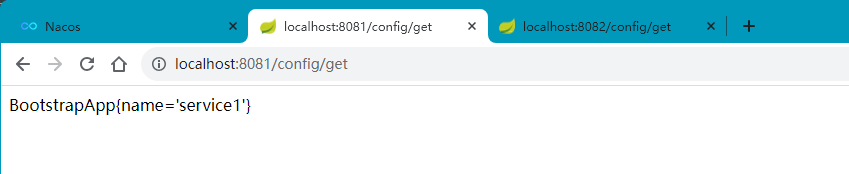
和运行 Spring Boot 项目一样,分别启动 service1 和 service2 项目,使用浏览器访问 http://localhost:8081/config/get 地址,如下图:
访问 http://localhost:8082/config/get 地址,如下图:



 川公网安备51010802032098