本文介绍 Ollama 支持思考能力的 AI 模型,如 Qwen3 和 DeepSeek R1。详解如何在 API 和 CLI 中启用 thinking 功能,分离推理轨迹与最终答案。提供 Python、JavaScript 及 cURL 代码示例,涵盖流式与非流式传输配置,帮助用户透明化模型逻辑推导过程。
具备思考能力的人工智能模型在运行过程中会形成一种独特的思考场,这一特殊机制能够清晰地将模型内部的推理轨迹与最终输出的答案分离开来。
借助这一功能,使用者可以有效审核模型的推理步骤,查看其逻辑推导过程是否严谨合理;也能够在用户交互界面中直观模拟并展示模型的完整思考路径,让推理过程更加透明。
同时,在仅需获取最终响应结果的场景下,还可以将推理轨迹完全隐藏,使输出内容更加简洁直接。
支持思考的模型如下:
在 API 调用中启用思考功能
在与大模型进行聊天或生成文本的请求中设置 think 字段,可以用来开启思考功能,大多数模型接受布尔值(true 开启 / false 关闭)。
注意:
(1)GPT-OSS 模型则期望使用 low、medium 或 high 中的一个来调整追踪长度,不能完全禁用。
(2)大模型返回的数据中,message.thinking(聊天端点)或 thinking(生成端点)字段包含推理轨迹,而 message.content/response 字段则包含最终答案。
非流式传输推理轨迹
下面介绍在非流式情况下如何开启推理轨迹,下面介绍三种方式:
注意:运行后续示例前,请先使用 ollama run qwen3:4b-thinking 命令运行 ollama。
cURL
最简单,直接使用 cURL 方式,如下:
curl http://localhost:11434/api/chat -d '{
  "model": "qwen3:4b-thinking",
  "messages": [{
    "role": "user",
    "content": "单词 strawberry 中包含多少个字母 r?"
  }],
  "think": true,
  "stream": false
}'
运行结果:
{
    "model": "qwen3:4b-thinking",
    "created_at": "2026-04-03T05:29:07.6714487Z",
    "message": {
        "role": "assistant",
        "content": "单词 \"strawberry\" 的拼写为:s-t-r-a-w-b-e-r-r-y。\n\n逐个字母检查:\n- 第 1 个字母:s\n- 第 2 个字母:t\n- 第 3 个字母:**r**\n- 第 4 个字母:a\n- 第 5 个字母:w\n- 第 6 个字母:b\n- 第 7 个字母:e\n- 第 8 个字母:**r**\n- 第 9 个字母:**r**\n- 第 10 个字母:y\n\n字母 \"r\" 出现在第 3、第 8 和第 9 个位置,因此 **包含 3 个字母 r**。\n\n**答案:3**",
        "thinking": "首先,问题是:“单词 strawberry 中包含多少个字母 r?”\n\n我需要计算单词 \"strawberry\" 中字母 \"r\" 出现的次数。\n\n让我写出单词:s-t-r-a-w-b-e-r-r-y\n\n现在,我将逐个字母检查:\n\n- 位置 1: s\n\n- 位置 2: t\n\n- 位置 3: r\n\n- 位置 4: a\n\n- 位置 5: w\n\n- 位置 6: b\n\n- 位置 7: e\n\n- 位置 8: r\n\n- 位置 9: r\n\n- 位置 10: y\n\n在单词 \"strawberry\" 中,字母 \"r\" 出现在:\n\n- 第 3 个位置:r\n\n- 第 8 个位置:r\n\n- 第 9 个位置:r\n\n所以,有三个 \"r\"。\n\n我也可以直接计数。\n\n单词:strawberry\n\n分解:s-t-r-a-w-b-e-r-r-y\n\n现在,列出所有字母:\n\n1. s\n\n2. t\n\n3. r\n\n4. a\n\n5. w\n\n6. b\n\n7. e\n\n8. r\n\n9. r\n\n10. y\n\n所以,r 出现在索引 3, 8, 和 9。\n\n因此,有 3 个 r。\n\n在英语中,单词 \"strawberry\" 通常拼写为 s-t-r-a-w-b-e-r-r-y,所以有两个连续的 r 在结尾。\n\n是的,标准拼写是 \"strawberry\",有三个 r:一个在 \"str\" 中,两个在结尾 \"rr\"。\n\n\"strawberry\" 从 \"straw\" 开始,但 \"straw\" 有 s-t-r-a-w,所以一个 r,然后 \"berry\" 有 b-e-r-r-y,所以两个 r,总共三个 r。\n\n是的。\n\n我可以用 Python 或简单计数来验证。\n\n假设我写一个字符串:s = \"strawberry\"\n\n然后,count = s.count('r')\n\n在 Python 中,s.count('r') 会返回 'r' 出现的次数。\n\n但既然我手动计数,就不用代码。\n\n在 \"strawberry\" 中:\n\n- 第一个 r: 在 \"str\" 中\n\n- 第二个 r: 在 \"berry\" 的 \"b-e-r\" 中\n\n- 第三个 r: 在 \"berry\" 的 \"r-r-y\" 中,所以两个连续的 r。\n\n在 \"berry\" 部分:b-e-r-r-y,所以 r 出现两次。\n\n加上 \"str\" 中的一个 r,总共三个。\n\n是的。\n\n如果问题是指大小写,但单词是小写 \"strawberry\",字母 r 也是小写,所以没有问题。\n\n问题说“字母 r”,在上下文中,是小写 r,但单词中都是小写,所以应该没问题。\n\n在英语中,字母计数通常不区分大小写,但这里单词是小写,所以直接计数。\n\n所以,答案应该是 3。\n\n但让我双重确认拼写。\n\n标准英语单词:strawberry\n\n拼写:S-T-R-A-W-B-E-R-R-Y\n\n字母:S, T, R, A, W, B, E, R, R, Y\n\n所以,R 出现三次。\n\n在位置:3rd, 8th, and 9th letter.\n\n是的。\n\n我也可以数总字母数:strawberry 有 10 个字母。\n\nr 出现:在索引 2(如果从0开始),但通常从1开始计数。\n\n在字符串索引中:\n\ns:0, t:1, r:2, a:3, w:4, b:5, e:6, r:7, r:8, y:9\n\n所以,r 在索引 2, 7, 8。\n\n三个位置。\n\n因此,有 3 个 r。\n\n问题说“包含多少个字母 r”,意思是字母 r 的数量。\n\n所以,答案是 3。\n\n但问题是用中文写的:“单词 strawberry 中包含多少个字母 r?”\n\n在中文中,字母 r 指的是英文字母 r。\n\n没有歧义。\n\n所以,我认为是 3。\n\n但让我确保没有陷阱。\n\n有时人们可能误读单词。\n\n例如,如果有人说 \"strawberry\" 有 \"str\" 但 \"str\" 不是单词,但这里是整个单词。\n\n另一个想法:在英语中,单词 \"strawberry\" 有时被误写,但标准是三个 r。\n\n我可以查一下。\n\n但既然是简单问题,我应该直接回答。\n\n在上下文中,用户可能期望数字。\n\n所以,我认为答案是 3。\n\n但问题中是“字母 r”,在中文中,字母 r 就是 r。\n\n或许用户想写“字母 r”,但 r 是字母。\n\n在中文中,说“字母 r” 意思是英文字母 r。\n\n是的。\n\n所以,最终答案:3\n\n但让我用另一个方法。\n\n写出来:s t r a w b e r r y\n\n现在,找 r:第三个字母是 r,第八个是 r(在 e 之后),第九个是 r(在第八个 r 之后),第十个是 y。\n\n所以,r 在:3,8,9 — 三个。\n\n是的。\n\n如果从1开始:位置1:s, 2:t, 3:r, 4:a, 5:w, 6:b, 7:e, 8:r, 9:r, 10:y\n\n所以位置3,8,9有r。\n\n三个。\n\n因此,单词 \"strawberry\" 中包含 3 个字母 r。\n\n所以,回答应该是 3。\n"
    },
    "done": true,
    "done_reason": "stop",
    "total_duration": 221881236300,
    "load_duration": 100444100,
    "prompt_eval_count": 19,
    "prompt_eval_duration": 904456500,
    "eval_count": 1401,
    "eval_duration": 220096835500
}
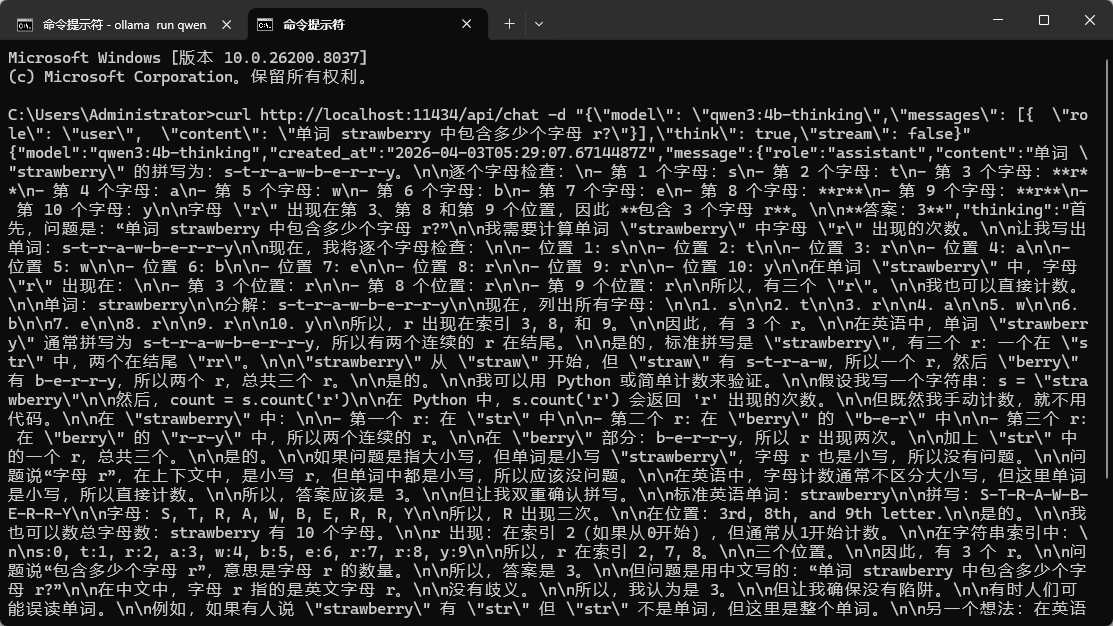
注意,在 Windows 下面需要将内容写在一行,并且 -d 后面使用双引号,内部的双引号需要转义。如下:
curl http://localhost:11434/api/chat -d "{\"model\": \"qwen3:4b-thinking\",\"messages\": [{ \"role\": \"user\", \"content\": \"单词 strawberry 中包含多少个字母 r?\"}],\"think\": true,\"stream\": false}"
Python
运行前,执行 pip install ollama 安装依赖库:
# 导入ollama库
from ollama import chat

response = chat(
    model='qwen3:4b-thinking',
    messages=[{'role': 'user', 'content': '单词 strawberry 中包含多少个字母 r?'}],
    think=True,
    stream=False,
)

# 输出信息
print('Thinking:\n', response.message.thinking)
print('Answer:\n', response.message.content)
运行结果:
$ python .\ollama_example6.py
Thinking:
 首先,问题是:“单词 strawberry 中包含多少个字母 r?”

我需要找出单词“strawberry”中字母“r”出现的次数。

.....

所以,我认为是3。

最终答案:3

Answer:
 单词 "strawberry" 的拼写是:s-t-r-a-w-b-e-r-r-y(共10个字母)。

其中,字母 "r" 出现的次数如下:
- 第3个字母:r
- 第8个字母:r
- 第9个字母:r

...

**结论**:单词 "strawberry" 中包含 **3 个** 字母 "r"。
JavaScript
运行前,执行 npm install ollama 命令安装依赖库:
import ollama from 'ollama'

const response = await ollama.chat({
  model: 'qwen3:4b-thinking',
  messages: [{ role: 'user', content: '单词 strawberry 中包含多少个字母 r?' }],
  think: true,
  stream: false,
})

console.log('Thinking:\n', response.message.thinking)
console.log('Answer:\n', response.message.content)
运行结果:
$ node .\ollama_example6.js

Thinking:
 首先,问题是:“单词 strawberry 中包含多少个字母 r?”
....
我认为正确。

所以,答案:3

Answer:
 单词 "strawberry" 的标准拼写是:s-t-r-a-w-b-e-r-r-y。

其中,字母 "r" 出现的次数为:
- 第 3 个字母:r
- 第 8 个字母:r
- 第 9 个字母:r

因此,**单词 "strawberry" 中包含 3 个字母 r**。
AI广告位
流式传输推理轨迹
思维流会在答案标记之前插入推理标记。检测到第一个thinking块时,就渲染一个“思维”部分,然后在message.content到达后切换到最终回复。
Python
运行前,执行 pip install ollama 安装依赖库:
from ollama import chat

# 发起流式思考对话请求
stream = chat(
    model='qwen3:4b-thinking',
    messages=[{'role': 'user', 'content': 'What is 17 × 23?'}],
    think=True, # 开启模型思考过程输出
    stream=True, #  开启流式传输
)

# 用于区分思考内容和答案内容,避免格式混乱
in_thinking = False

# 遍历流式返回的每一段数据(逐字/逐块接收)
for chunk in stream:
    # 当前片段是思考内容 + 之前还没开始打印思考
    if chunk.message.thinking and not in_thinking:
        in_thinking = True
        print('Thinking:\n', end='')

    # 如果当前是思考内容,直接逐字打印
    if chunk.message.thinking:
        print(chunk.message.thinking, end='')
    # 如果当前是回答内容
    elif chunk.message.content:
        if in_thinking:
            print('\n\nAnswer:\n', end='')  # 思考结束,输出答案标题
            in_thinking = False  # 退出思考阶段
        # 逐字打印答案内容
        print(chunk.message.content, end='')
运行结果:
$ python .\ollama_example7.py

Thinking:
Okay, let's see. I need to find 17 multiplied by 23. Hmm, how do I do this? Maybe I can use the standard multiplication method. Let me try that.

First, I remember that when multiplying two numbers, you can break it down by place value. So 17 is 10 + 7, and 23 is 20 + . Wait, no, 23 is 20 + 3. Maybe I can use the distributive property here. Like, (10 + 7) × (20 + 3). Let's expand that.
...
So all methods give 391. I think that's the correct answer. Let me just check with a calculator in my head. 17×20 is 340, 17×3 is 51, 340+51=391. Yep, that's right. I don't see any mistakes here. So the answer should be 391.


Answer:
To compute $ 17 \times 23 $, we can use multiple methods to ensure accuracy. Here's a clear and step-by-step explanation:

...

All methods consistently yield the same result.

$$
\boxed{391}
$$
JavaScript
运行前,执行 npm install ollama 命令安装依赖库:
import ollama from 'ollama'

// 主函数(异步,因为要处理流式响应)
async function main() {
  // 发起流式聊天请求,开启思考模式
  const stream = await ollama.chat({
    model: 'qwen3:4b-thinking',
    messages: [{ role: 'user', content: 'What is 17 × 23?' }],
    think: true,  // 启用思考过程输出
    stream: true  // 启用流式传输(逐字返回)
  })

  // 是否正在输出思考内容
  let inThinking = false

  // 遍历流式返回的每一段数据(异步迭代)
  for await (const chunk of stream) {
    // 第一次输出思考内容时,打印标题
    if (chunk.message.thinking && !inThinking) {
      inThinking = true
      process.stdout.write('Thinking:\n')
    }

    // 输出思考过程
    if (chunk.message.thinking) {
      process.stdout.write(chunk.message.thinking)
    }
    // 输出最终答案
    else if (chunk.message.content) {
      // 思考结束,切换到答案输出
      if (inThinking) {
        process.stdout.write('\n\nAnswer:\n')
        inThinking = false
      }
      process.stdout.write(chunk.message.content)
    }
  }
}

// 执行主函数
main()
运行结果:
$ node .\ollama_example7.js

Okay, let's see. I need to find what 17 multiplied by 23 is. Hmm, how do I do this? Well, I remember that multiplication can be done using the standard algorithm, or maybe breaking it down into smaller parts. Let me try both ways to check.

....

I think that's solid. So 17 × 23 is 391.


Answer:
To find the product of $17 \times 23$, we can use the **distributive property** to break down the multiplication into simpler steps:

....

**Final Answer:**
$$
\boxed{391}
$$
CLI 快速参考
启用单次运行的思考功能:
ollama run deepseek-r1 --think "Where should I visit in Lisbon?"
禁用思考功能:
ollama run deepseek-r1 --think=false "Summarize this article"
在使用思考模型的同时隐藏痕迹:
ollama run deepseek-r1 --hidethinking "Is 9.9 bigger or 9.11?"
在交互式会话中,可使用/set think或/set nothink进行切换。
注意:
(1)GPT-OSS 仅接受 low、medium、high 级别:
# 根据需要将 low 替换为 medium 或 high
ollama run gpt-oss --think=low "Draft a headline"
(2)对于支持的模型,在命令行界面(CLI)和应用程序编程接口(API)中,思考功能默认是开启的。
原文:https://docs.ollama.com/capabilities/thinking#javascript-2
沉浸于现实的忙碌之中,没有时间和精力思念过去,成功也就不会太远了。——雷音







 川公网安备51010802032098