Collection 接口(java.util.Collection)是 Java 集合 API 的核心根接口之一。虽然你无法直接实例化 Collection 接口本身,而需要实例化其具体子类型(如 ArrayList、HashSet 等),但这些子类型都遵循相同的方法签名规范,因此你通常可以将它们统一视为 Collection 类型来处理。这种设计体现了面向对象编程的多态特性,使得代码能够灵活地适配不同的集合实现,同时保持接口调用的一致性。
创建 Collection
如上所述,你并不是直接创建一个 Collection 实例,而是创建一个 Collection 子类型的实例。下面是创建 List 的示例,List 是 Collection 的子类型:
// 创建了一个 ArrayList 对象
Collection collection = new ArrayList();
Collection collection = new HashSet();
注意,上述示例适用于 Collection 的每个子类型。
Collection 子类型
以下接口(集合类型)扩展了 Collection 接口:
List 有序集合,允许重复元素,可通过索引访问
Set 不允许重复元素的集合,通常无序
SortedSet 继承自 Set,元素按自然顺序或自定义比较器排序
NavigableSet 继承自 SortedSet,提供导航方法(如获取小于 / 大于特定值的元素)
Queue 按特定顺序(通常是 FIFO)处理元素的集合,用于实现队列
Deque 双端队列,允许在两端插入和移除元素,兼具队列和栈的特性
在 Java 中,没有提供可用的 Collection 接口实现(即没有具体类是直接实现 Collection 接口,而是实现了它的子接口),因此你必须使用列出的其中一个子类型。Collection 接口只是定义了一组方法(行为),这些 Collection 子类型共享这些方法(可以理解为 Collection 是对一堆接口的再次抽象,提取出这些接口的公共特性)。这样就可以忽略你使用的是哪种特定类型的 Collection,而只将其视为 Collection。
下面是一个对 Collection 进行操作的方法:
package com.hxstrive.java_collection;

import java.util.ArrayList;
import java.util.Collection;
import java.util.HashSet;
import java.util.Iterator;

public class MyCollectionUtil {

    // 定义一个方法,接收 Collection 参数
    // 通过迭代器迭代 Collection 参数中的内容
    public static void doSomething(Collection collection) {
        Iterator iterator = collection.iterator();
        while (iterator.hasNext()) {
            Object object = iterator.next();
            System.out.println(object);
        }
    }

    public static void main(String[] args) {
        // 使用 ArrayList 具体类作为参数
        Collection collection1 = new ArrayList();
        collection1.add("one");
        collection1.add("two");
        collection1.add("three");
        doSomething(collection1);

        // 使用 HashSet 具体类作为参数
        Collection collection2 = new HashSet();
        collection2.add("11");
        collection2.add("22");
        collection2.add("33");
        doSomething(collection2);
    }

}
运行结果:
one
two
three
11
22
33
向集合中添加元素
无论你使用的是哪种 Collection 子类型,都有几种标准方法可以将元素添加到 Collection 中。通过 add() 方法可以向 Collection 中添加元素。例如:
package com.hxstrive.java_collection;

import java.util.Collection;
import java.util.HashSet;
import java.util.ArrayList;

public class CollectionAddExamples {
    public static void main(String[] args) {
        String anElement = "an element";
        Collection<String> collection = new HashSet<>();

        // 1. 添加单个元素
        boolean didCollectionChange = collection.add(anElement);
        System.out.println("添加单个元素是否成功: " + didCollectionChange);

        // 2. 添加另一个集合中的所有元素
        Collection<String> anotherCollection = new ArrayList<>();
        anotherCollection.add("element 2");
        anotherCollection.add("element 3");

        boolean allAdded = collection.addAll(anotherCollection);
        System.out.println("添加集合中所有元素是否成功: " + allAdded);

        // 打印结果
        System.out.println("集合中的所有元素:");
        for (String element : collection) {
            System.out.println("- " + element);
        }
    }
}
运行结果:
添加单个元素是否成功: true
添加集合中所有元素是否成功: true
集合中的所有元素:
- element 3
- element 2
- an element
上述代码中,add() 方法用于将指定元素添加到集合中,其返回值为 boolean 类型:当集合因本次添加操作发生改变时,返回 true;若集合未发生变化,则返回 false。具体行为会因集合类型不同而有所差异:对于 Set 这类不允许重复元素的集合,若待添加元素已存在,add () 方法会放弃添加且返回 false,集合保持不变;而对于 List 这类允许重复元素的集合,即便元素已存在,add () 方法仍会执行添加操作,使该元素在集合中出现多次,此时返回 true。
而 addAll() 方法将作为参数传递的 Collection 中的所有元素添加到集合中,集合对象本身不会被添加,只添加其元素。如果以集合作为参数调用 add() 方法,那么添加的将是集合对象本身,而不是其元素。
java 广告位
从集合中移除元素
remove() 方法从集合中移除给定的元素,如果被移除的元素在集合中存在并已被移除,则 remove() 方法返回 true。如果元素不存在,remove() 方法返回 false。例如:
package com.hxstrive.java_collection;

import java.util.Collection;
import java.util.HashSet;

public class CollectionRemoveExample {
    public static void main(String[] args) {
        // 创建集合并添加元素
        Collection<String> collection = new HashSet<>();
        collection.add("apple");
        collection.add("banana");
        collection.add("cherry");
        System.out.println("初始集合: " + collection);

        // 移除存在的元素
        boolean wasRemoved1 = collection.remove("banana");
        System.out.println("是否移除了 'banana': " + wasRemoved1);
        System.out.println("移除后集合: " + collection);

        // 移除不存在的元素
        boolean wasRemoved2 = collection.remove("date");
        System.out.println("是否移除了 'date': " + wasRemoved2);
        System.out.println("操作后集合: " + collection);

        // 对于List集合的移除示例(会移除第一个匹配的元素)
        Collection<String> list = new java.util.ArrayList<>();
        list.add("apple");
        list.add("apple"); // 添加重复元素
        System.out.println("\nList初始集合: " + list);

        boolean wasListElementRemoved = list.remove("apple");
        System.out.println("List中是否移除了 'apple': " + wasListElementRemoved);
        System.out.println("List移除后集合: " + list); // 仅移除第一个匹配元素
    }
}
运行结果:
初始集合: [banana, apple, cherry]
是否移除了 'banana': true
移除后集合: [apple, cherry]
是否移除了 'date': false
操作后集合: [apple, cherry]

List初始集合: [apple, apple]
List中是否移除了 'apple': true
List移除后集合: [apple]
注意:remove(Object o) 方法会从集合中移除第一个与指定元素相等的对象。对于 Set 集合(如 HashSet),由于不允许重复元素,移除操作只会影响最多一个元素。对于 List 集合(如 ArrayList),会移除第一个匹配的元素,保留后续可能存在的相同元素。
除了 remove() 方法,还提供了批量删除方法 removeAll(),该方法会删除作为参数传递给该方法的集合中的所有元素。如果 Collection 参数包含任何未在目标集合中找到的元素,这些元素将被忽略。示例:
package com.hxstrive.java_collection;

import java.util.Collection;
import java.util.HashSet;
import java.util.ArrayList;

public class CollectionRemoveAllExample {
    public static void main(String[] args) {
        // 创建目标集合并添加元素
        Collection<String> collection = new HashSet<>();
        collection.add("a");
        collection.add("b");
        collection.add("c");
        collection.add("d");
        collection.add("e");
        System.out.println("初始集合: " + collection);

        // 创建包含要删除元素的集合
        Collection<String> objectsToRemove = new ArrayList<>();
        objectsToRemove.add("b");
        objectsToRemove.add("d");
        objectsToRemove.add("f"); // 这个元素在目标集合中不存在

        // 执行批量删除
        boolean didChange = collection.removeAll(objectsToRemove);
        System.out.println("集合是否发生变化: " + didChange);
        System.out.println("删除后集合: " + collection);

        // 对List集合的批量删除示例
        Collection<String> list = new ArrayList<>();
        list.add("x");
        list.add("y");
        list.add("x");
        list.add("z");
        System.out.println("\nList初始集合: " + list);

        Collection<String> listToRemove = new ArrayList<>();
        listToRemove.add("x");
        boolean listChanged = list.removeAll(listToRemove);
        System.out.println("List是否发生变化: " + listChanged);
        System.out.println("List删除后集合: " + list); // 所有"x"都会被删除
    }
}
运行结果:
初始集合: [a, b, c, d, e]
集合是否发生变化: true
删除后集合: [a, c, e]

List初始集合: [x, y, x, z]
List是否发生变化: true
List删除后集合: [y, z]
注意,removeAll() 方法会删除目标集合中所有存在于参数集合中的元素,方法返回值为 boolean,表示目标集合是否因该操作发生了变化(true-表示发生了变化,false-表示未发生变化)。对于参数集合中不存在于目标集合的元素,会被自动忽略。对于允许重复元素的集合(如 ArrayList),会删除所有匹配的元素,而不仅仅是删除第一个。
从一个集合中保留另一个集合中的所有元素
retainAll() 方法的作用与 removeAll() 相反。它不会删除参数集合中的所有元素,而是保留所有这些元素,并删除所有其他元素。请记住,只有当这些元素已经包含在目标集合中时,它们才会被保留。在参数 “Collection”中发现的任何新元素,如果不在目标集合中,都不会被自动添加,只会被忽略。如下图:
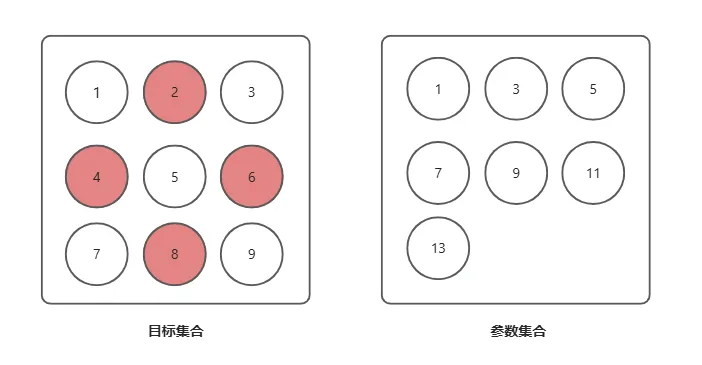
上图中,当调用目标集合的 retainAll() 方法,参数集合作为参数时,目标集合仅会保留 1、3、5、7、9 五个元素,参数集合中的 11、13 元素也将被删除,因为它们不在目标集合中。
例如:
package com.hxstrive.java_collection;

import java.util.ArrayList;
import java.util.Arrays;
import java.util.Collection;
import java.util.HashSet;

public class CollectionRetainAllExample {
    public static void main(String[] args) {
        // 创建两个源集合
        Collection<String> colA = new ArrayList<>();
        Collection<String> colB = new ArrayList<>();

        // 向内添加元素
        colA.addAll(Arrays.asList("1", "2", "3", "4", "5", "6", "7", "8", "9"));
        colB.addAll(Arrays.asList("1", "3", "5", "7", "9", "11", "13"));

        // 保留与colB共有的元素
        boolean didChange = colA.retainAll(colB);
        System.out.println("是否发生变更: " + didChange); // true
        System.out.println("保留与colB交集后: " + colA); // [1, 3, 5, 7, 9]

        // 演示对空集合的操作
        Collection<String> emptyCol = new ArrayList<>();
        colA.retainAll(emptyCol);
        System.out.println("与空集合取交集后: " + colA); // []
    }
}
运行结果:
是否发生变更: true
保留与colB交集后: [1, 3, 5, 7, 9]
与空集合取交集后: []
注意,retainAll() 方法用于保留目标集合中与参数集合共有的元素(取交集),删除其他所有元素。该方法返回值为 boolean,表示目标集合是否因该操作发生了变化。当参数集合为空时,目标集合会被清空(因为没有共同元素)。
java 广告位
检查集合是否包含特定元素
Collection 接口提供了两个方法用于检查集合是否包含一个或多个特定元素。分别是 contains() 和 containsAll() 方法。例如:
package com.hxstrive.java_collection;

import java.util.Collection;
import java.util.HashSet;

public class CollectionContainsExamples {
    public static void main(String[] args) {
        // 创建主集合并添加元素
        Collection<String> collection = new HashSet<>();
        collection.add("apple");
        collection.add("banana");
        collection.add("cherry");
        collection.add("date");
        System.out.println("主集合元素: " + collection);

        // 1. 使用contains()检查单个元素是否存在
        String checkElement1 = "banana";
        boolean containsElement1 = collection.contains(checkElement1);
        System.out.println("是否包含 '" + checkElement1 + "': " + containsElement1); // true

        String checkElement2 = "grape";
        boolean containsElement2 = collection.contains(checkElement2);
        System.out.println("是否包含 '" + checkElement2 + "': " + containsElement2); // false

        // 2. 使用containsAll()检查多个元素是否都存在
        Collection<String> elements1 = new HashSet<>();
        elements1.add("apple");
        elements1.add("cherry");
        boolean containsAll1 = collection.containsAll(elements1);
        System.out.println("\n是否包含所有元素 " + elements1 + ": " + containsAll1); // true

        Collection<String> elements2 = new HashSet<>();
        elements2.add("banana");
        elements2.add("grape"); // 不存在的元素
        boolean containsAll2 = collection.containsAll(elements2);
        System.out.println("是否包含所有元素 " + elements2 + ": " + containsAll2); // false

        // 3. 检查空集合
        Collection<String> emptyCollection = new HashSet<>();
        boolean containsEmpty = collection.containsAll(emptyCollection);
        System.out.println("是否包含空集合中的所有元素: " + containsEmpty); // true (特殊情况)
    }
}
运行结果:
主集合元素: [banana, date, apple, cherry]
是否包含 'banana': true
是否包含 'grape': false

是否包含所有元素 [apple, cherry]: true
是否包含所有元素 [banana, grape]: false
是否包含空集合中的所有元素: true
注意:
contains(Object o):判断集合中是否包含指定元素,返回true表示存在,false表示不存在。
containsAll(Collection<?> c):判断集合中是否包含参数集合中的所有元素,只有当所有元素都存在时才返回true,否则返回 false。当参数集合为空时,containsAll() 始终返回true(因为空集合中没有元素需要检查)。
contains() 和 containsAll() 方法的判断都是基于元素的 equals() 方法,因此集合中元素的类应正确实现 equals() 方法。
集合大小
使用 size() 方法可以检查集合的大小。所谓 “大小 ”是指集合中元素的数量。下面是一个示例:
package com.hxstrive.java_collection;

import java.util.Collection;
import java.util.ArrayList;
import java.util.HashSet;

public class CollectionSizeExample {
    public static void main(String[] args) {
        // 演示不同集合的size()方法
        Collection<String> arrayList = new ArrayList<>();
        Collection<Integer> hashSet = new HashSet<>();

        // 向ArrayList添加元素
        arrayList.add("Java");
        arrayList.add("Python");
        arrayList.add("Java"); // ArrayList允许重复元素

        int arrayListSize = arrayList.size();
        System.out.println("ArrayList中的元素数量: " + arrayListSize); // 输出 3
        System.out.println("ArrayList内容: " + arrayList); // [Java, Python, Java]

        // 向HashSet添加元素
        hashSet.add(10);
        hashSet.add(20);
        hashSet.add(10); // HashSet不允许重复元素,此元素不会被添加
        int hashSetSize = hashSet.size();
        System.out.println("\nHashSet中的元素数量: " + hashSetSize); // 输出 2
        System.out.println("HashSet内容: " + hashSet); // [10, 20]

        // 演示空集合的size()
        Collection<Double> emptyCollection = new ArrayList<>();
        System.out.println("\n空集合的元素数量: " + emptyCollection.size()); // 输出 0

        // 演示集合操作对size的影响
        arrayList.remove("Python");
        System.out.println("\n移除元素后ArrayList的大小: " + arrayList.size()); // 输出 2
    }
}
运行结果:
ArrayList中的元素数量: 3
ArrayList内容: [Java, Python, Java]

HashSet中的元素数量: 2
HashSet内容: [20, 10]

空集合的元素数量: 0

移除元素后ArrayList的大小: 2
java 广告位
迭代一个集合
你可以遍历集合中的所有元素。方法是从集合中获取一个 Iterator,然后遍历该 Iterator。如下所示
package com.hxstrive.java_collection;

import java.util.Collection;
import java.util.HashSet;
import java.util.Iterator;

public class CollectionIteratorExample {
    public static void main(String[] args) {
        // 创建集合并添加元素
        Collection<String> collection = new HashSet<>();
        collection.add("Apple");
        collection.add("Banana");
        collection.add("Cherry");
        collection.add("Date");
        System.out.println("集合中的元素:");

        // 获取迭代器并遍历集合
        Iterator<String> iterator = collection.iterator();
        while (iterator.hasNext()) {
            // 注意:这里使用了泛型指定元素类型,避免强制类型转换
            String element = iterator.next();
            System.out.println(element);

            // 演示迭代过程中删除元素(HashSet中"Banana"会被删除)
            if ("Banana".equals(element)) {
                iterator.remove();
                System.out.println("已删除元素: " + element);
            }
        }
        // 遍历后查看集合内容
        System.out.println("\n删除元素后的集合: " + collection);
    }
}
运行结果:
集合中的元素:
Apple
Cherry
Date
Banana
已删除元素: Banana

删除元素后的集合: [Apple, Cherry, Date]
也可以使用 Java 的“for-each”循环来迭代一个 Java 集合:
package com.hxstrive.java_collection;

import java.util.ArrayList;
import java.util.Collection;
import java.util.HashSet;

public class CollectionForEachExample {
    public static void main(String[] args) {
        // 创建集合并添加元素
        Collection<String> collection = new HashSet<>();
        collection.add("A");
        collection.add("B");
        collection.add("C");
        collection.add("D");

        System.out.println("使用增强for循环遍历HashSet:");
        // 增强for循环遍历(适用于所有实现了Iterable接口的集合)
        for (String element : collection) {  // 使用泛型指定类型,避免强制转换
            System.out.println(element);
        }

        // 对比ArrayList的遍历顺序(有序)
        Collection<String> arrayList = new ArrayList<>();
        arrayList.add("A");
        arrayList.add("B");
        arrayList.add("C");
        arrayList.add("D");

        System.out.println("\n使用增强for循环遍历ArrayList:");
        for (String element : arrayList) {
            System.out.println(element);
        }

        // 演示遍历中尝试修改集合的错误(会抛出ConcurrentModificationException)
        System.out.println("\n演示遍历中修改集合的错误:");
        try {
            for (String element : collection) {
                if ("B".equals(element)) {
                    collection.remove(element);  // 错误的修改方式
                }
            }
        } catch (java.util.ConcurrentModificationException e) {
            System.out.println("发生异常: " + e.getMessage());
            System.out.println("提示: 增强for循环中不能直接修改集合结构");
        }
    }
}
运行结果:
使用增强for循环遍历HashSet:
A
B
C
D

使用增强for循环遍历ArrayList:
A
B
C
D

演示遍历中修改集合的错误:
发生异常: null
提示: 增强for循环中不能直接修改集合结构
注意,增强 for 循环(for-each 循环)是遍历集合的简化语法,适用于所有实现了 Iterable 接口的集合。相比迭代器,增强 for 循环代码更简洁,但不支持在遍历过程中修改集合结构(会抛出ConcurrentModificationException)。配合泛型使用(如 Collection<String>)可以在遍历中直接获取指定类型的元素,避免类型转换,非常方便。若需要在遍历中删除元素,应使用迭代器的 remove() 方法而非增强 for 循环。
更多信息参考https://docs.oracle.com/javase/8/docs/api/java/util/Collection.html API 文档。


 川公网安备51010802032098