在 mysql 命令行中,除了执行 SQL 语句,还有一些实用的快捷命令:
获取帮助
可以使用 help 获取帮助信息,这类似 Linux 的 man 命令,例如:
mysql> help;

For information about MySQL products and services, visit:
   http://www.mysql.com/
For developer information, including the MySQL Reference Manual, visit:
   http://dev.mysql.com/
To buy MySQL Enterprise support, training, or other products, visit:
   https://shop.mysql.com/

List of all MySQL commands:
Note that all text commands must be first on line and end with ';'
?         (\?) Synonym for `help'.
clear     (\c) Clear the current input statement.
connect   (\r) Reconnect to the server. Optional arguments are db and host.
delimiter (\d) Set statement delimiter.
ego       (\G) Send command to mysql server, display result vertically.
exit      (\q) Exit mysql. Same as quit.
go        (\g) Send command to mysql server.
help      (\h) Display this help.
notee     (\t) Don't write into outfile.
print     (\p) Print current command.
prompt    (\R) Change your mysql prompt.
quit      (\q) Quit mysql.
rehash    (\#) Rebuild completion hash.
source    (\.) Execute an SQL script file. Takes a file name as an argument.
status    (\s) Get status information from the server.
system    (\!) Execute a system shell command.
tee       (\T) Set outfile [to_outfile]. Append everything into given outfile.
use       (\u) Use another database. Takes database name as argument.
charset   (\C) Switch to another charset. Might be needed for processing binlog with multi-byte charsets.
warnings  (\W) Show warnings after every statement.
nowarning (\w) Don't show warnings after every statement.
resetconnection(\x) Clean session context.
query_attributes Sets string parameters (name1 value1 name2 value2 ...) for the next query to pick up.

For server side help, type 'help contents'
获取 select 的帮助信息:
mysql> help select;
ERROR 2013 (HY000): Lost connection to MySQL server during query
No connection. Trying to reconnect...
Connection id:    24
Current database: ecommerce

Name: 'SELECT'
Description:
Syntax:
SELECT
    [ALL | DISTINCT | DISTINCTROW ]
    [HIGH_PRIORITY]
    [STRAIGHT_JOIN]
    [SQL_SMALL_RESULT] [SQL_BIG_RESULT] [SQL_BUFFER_RESULT]
    [SQL_NO_CACHE] [SQL_CALC_FOUND_ROWS]
    select_expr [, select_expr] ...
    [into_option]
    [FROM table_references
      [PARTITION partition_list]]
    [WHERE where_condition]
    [GROUP BY {col_name | expr | position}, ... [WITH ROLLUP]]
    [HAVING where_condition]
    [WINDOW window_name AS (window_spec)
        [, window_name AS (window_spec)] ...]
...
清屏
system 命令的作用是在 MySQL 客户端里调用操作系统原生命令,Windows 和 Linux 系统自带清屏指令不一样,不能混用。例如:
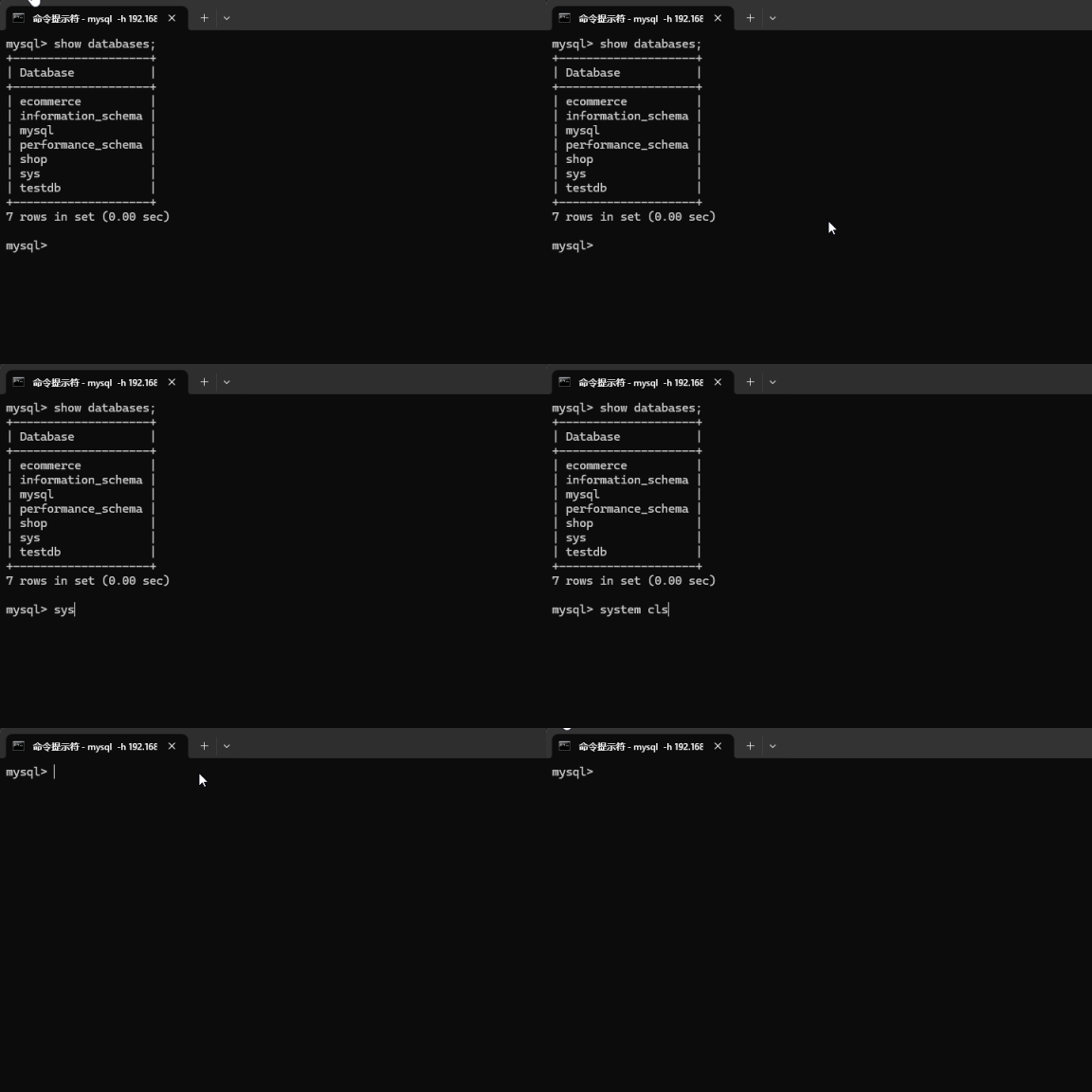
注意,如果调用 system clear 失败,退出客户端,查看系统中是否存在 clear 命令,特别是 Docker 安装时,这个命令默认是没有的。
执行系统命令
在 mysql 客户端中,可以使用 system 命令执行一些系统命令,例如:
-- 在 Windows 中
mysql> system dir;
 驱动器 C 中的卷是 Windows-SSD
 卷的序列号是 C83B-0193

 C:\Users\hxstr 的目录

2026/06/21  22:12    <DIR>          .
2026/03/30  21:31    <DIR>          ..
2026/03/27  23:20    <DIR>          .agents
2026/07/03  22:33    <DIR>          .aitk
...

--在 Linux 中
mysql> system ls;
afs  bin  boot  dev  docker-entrypoint-initdb.d  entrypoint.sh  etc  home  lib  lib64  media  mnt  opt  proc  root  run  sbin  srv  sys  tmp  usr  var
切换数据库
切换数据库前面已经学习过了,例如:
-- 切换到 testdb 数据库
mysql> use testdb;
Database changed

-- 切换到 shop 数据库
mysql> use shop;
Database changed
查看当前用户
可以使用 USER() 函数查看当前登录的 MySQL 用户,例如:
mysql> select user();
+--------------------+
| user()             |
+--------------------+
| root@192.168.116.1 |
+--------------------+
1 row in set (0.00 sec)
查看MySQL版本
使用 version() 函数,例如:
mysql> select version();
+-----------+
| version() |
+-----------+
| 8.0.46    |
+-----------+
1 row in set (0.00 sec)
查看当前时间
使用 now() 或者 current_timestamp 实现,例如:
mysql> select now();
+---------------------+
| now()               |
+---------------------+
| 2026-07-04 22:46:29 |
+---------------------+
1 row in set (0.00 sec)

mysql> select current_timestamp;
+---------------------+
| current_timestamp   |
+---------------------+
| 2026-07-04 22:46:38 |
+---------------------+
1 row in set (0.00 sec)
执行 SQL 文件
假如在根目录创建了一个 script.sql 文件,内容如下:
bash-5.1# cat /script.sql
show databases;
use shop;
show tables;
注意,脚本文件位于 Docker MySQL 容器所在的 Linux 系统的根目录。
此时,使用 source 命令执行该 SQL 脚本文件,例如:
mysql> source /script.sql;
+--------------------+
| Database           |
+--------------------+
| ecommerce          |
| information_schema |
| mysql              |
| performance_schema |
| shop               |
| sys                |
| testdb             |
+--------------------+
7 rows in set (0.01 sec)

Reading table information for completion of table and column names
You can turn off this feature to get a quicker startup with -A

Database changed
+----------------+
| Tables_in_shop |
+----------------+
| NewTable       |
| products       |
| users          |
+----------------+
设置输出格式
使用 PAGER 和 NOPAGER 命令设置和取消分页设置,例如:
-- 设置输出格式,Linux/Mac,使用less分页
mysql> pager less -n -i -S;
PAGER set to 'less -n -i -S'

-- 设置完分页,试着去查询数据库表
-- 报错了,提示 less 不是系统命令,这是因为 docker 容器是精简版 Linux,很多命令没有
mysql> show tables;
sh: line 1: less: command not found
38 rows in set (0.00 sec)

-- 取消分页
mysql> nopager;
PAGER set to stdout
注意,如果容器 Linux 没有 less 命令,我们可以安装一个,如下:
bash-5.1# microdnf install less
Package                                                                                                        Repository                                 Size
Installing:
 less-590-6.el9.x86_64                                                                                         ol9_baseos_latest                      179.0 kB
Transaction Summary:
 Installing:        1 packages
 Reinstalling:      0 packages
 Upgrading:         0 packages
 Obsoleting:        0 packages
 Removing:          0 packages
 Downgrading:       0 packages
Downloading packages...
Running transaction test...
Installing: less;590-6.el9;x86_64;ol9_baseos_latest
Complete.

bash-5.1# less
Missing filename ("less --help" for help)
安装成功后,再试试 show tables 呢,效果如下图:
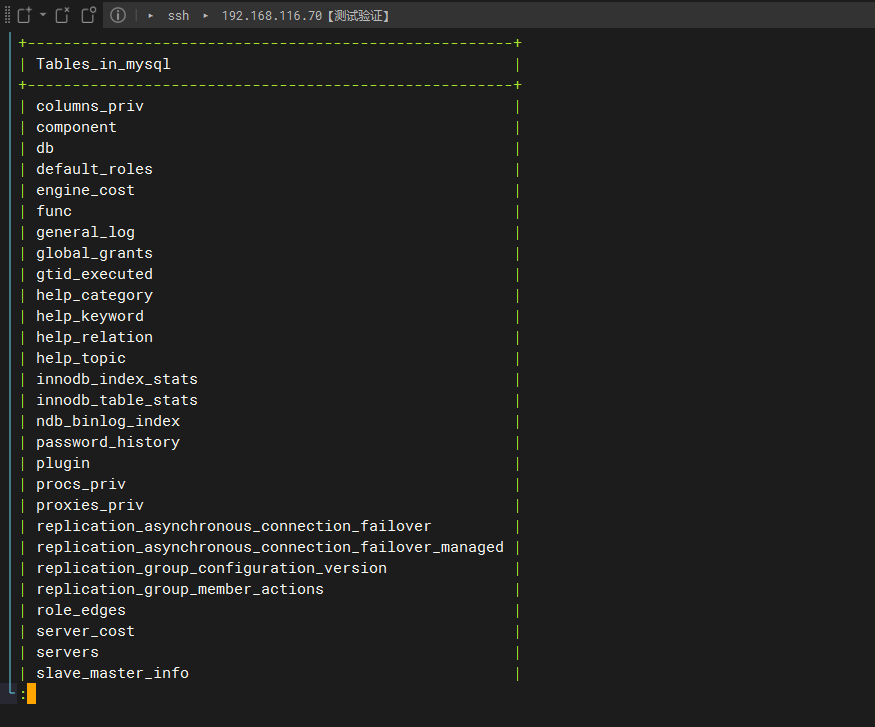
已经支持分页了,不需要可以使用 NOPAGER 取消分页。
更多知识请阅读后续章节……谢谢!!!


 川公网安备51010802032098