在 Web 应用中,登录功能是用户与系统交互的重要入口。而登录失败处理则是保障系统安全、提升用户体验的关键环节。Spring Security6 为我们提供了灵活的机制来自定义登录失败的处理逻辑,本文将详细介绍如何在 Spring Security6 中实现这一功能。
默认登录失败处理机制
在 Spring Security6 的默认配置下,当用户登录失败时(如用户名或密码错误),会被重定向到登录页面,并在 URL 中添加 error 参数(例如 /login?error)。此时,登录页面需要自行解析该参数并显示相应的错误信息,如下图:
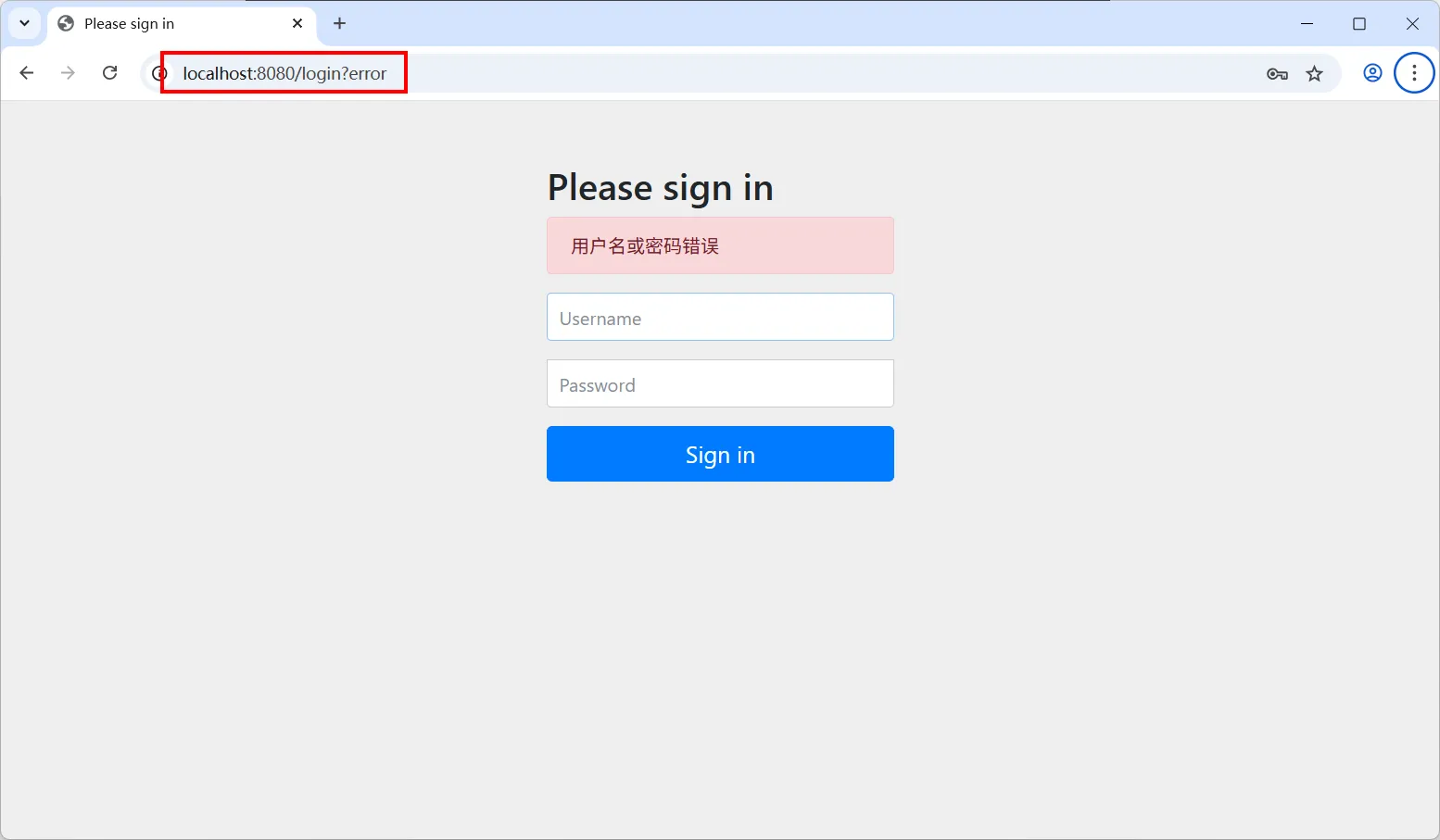 这种默认处理方式在简单应用中可能足够,但在复杂场景下存在局限性,例如:
接下来,我们将介绍如何自定义登录失败处理,解决上述问题。
自定义登录失败处理器
创建自定义登录失败处理器
要实现自定义登录失败处理,我们需要创建一个实现 AuthenticationFailureHandler 接口的类,并在其中编写具体的处理逻辑。
AuthenticationFailureHandler 接口用于自定义处理用户认证失败的场景。该接口允许开发者在用户登录失败时执行自定义逻辑,如记录日志、显示友好错误信息、限制登录尝试次数等。
接口定义如下:
package org.springframework.security.web.authentication;

import java.io.IOException;
import jakarta.servlet.ServletException;
import jakarta.servlet.http.HttpServletRequest;
import jakarta.servlet.http.HttpServletResponse;
import org.springframework.security.authentication.CredentialsExpiredException;
import org.springframework.security.core.AuthenticationException;

/**
 * 用于处理身份验证尝试失败的策略。
 * <p>
 * 典型的行为可能是将用户重定向到身份验证页面(在表单登录的情况下),让他们可以再次尝试。
 * 根据异常类型,可能会实施更复杂的逻辑。
 * 例如,{@link CredentialsExpiredException}(凭证过期异常)可能会导致重定向到一个Web
 * 控制器,该控制器允许用户更改密码。
 *
 * @author Luke Taylor
 * @since 3.0
 */
public interface AuthenticationFailureHandler {

	/**
	 * 当身份验证尝试失败时调用。
	 * @param request 发生身份验证尝试期间的请求。
	 * @param response 响应。
	 * @param exception 抛出的用于拒绝身份验证请求的异常。
	 */
	void onAuthenticationFailure(HttpServletRequest request, HttpServletResponse response,
			AuthenticationException exception) throws IOException, ServletException;

}
当用户认证失败时,Spring Security 会调用 onAuthenticationFailure() 方法。开发者可在此方法中实现自定义逻辑,如重定向、转发、返回 JSON 响应等。
onAuthenticationFailure() 方法参数说明:
注意,Spring Security6 提供了多种 AuthenticationException 异常类的子类,常见的异常类如下:
异常类 | 异常类说明 |
BadCredentialsException | 用户名或密码错误 |
LockedException | 账户被锁定 |
DisabledException | 账户被禁用 |
AccountExpiredException | 账户已过期 |
CredentialsExpiredException | 密码已过期 |
AuthenticationServiceException | 认证服务异常(如数据库错误) |
spring 广告位
以下是一个简单的示例:
package com.hxstrive.spring_security.customer;

import jakarta.servlet.ServletException;
import jakarta.servlet.http.HttpServletRequest;
import jakarta.servlet.http.HttpServletResponse;
import org.springframework.security.authentication.*;
import org.springframework.security.core.AuthenticationException;
import org.springframework.security.web.authentication.AuthenticationFailureHandler;
import org.springframework.stereotype.Component;
import java.io.IOException;

@Component
public class CustomAuthenticationFailureHandler implements AuthenticationFailureHandler {

    @Override
    public void onAuthenticationFailure(HttpServletRequest request, HttpServletResponse response,
                                        AuthenticationException exception) throws IOException, ServletException {
        // 获取用户名(如果有)
        String username = request.getParameter("username");
        // 记录登录失败日志
        System.err.println("用户 '" + username + "' 登录失败: " + exception.getMessage());

        // 根据不同的异常类型处理登录失败
        String errorMessage = getErrorMessage(exception);
        // 将错误信息存储到session中
        request.getSession().setAttribute("errorMessage", errorMessage);

        // 重定向到登录页面
        response.sendRedirect(request.getContextPath() + "/login?error");
    }

    // 根据不同的异常类型返回不同的错误信息
    private String getErrorMessage(AuthenticationException exception) {
        if (exception instanceof BadCredentialsException) {
            return "用户名或密码错误";
        } else if (exception instanceof LockedException) {
            return "账户已被锁定,请联系管理员";
        } else if (exception instanceof DisabledException) {
            return "账户已被禁用,请联系管理员";
        } else if (exception instanceof AccountExpiredException) {
            return "账户已过期,请联系管理员";
        } else if (exception instanceof CredentialsExpiredException) {
            return "密码已过期,请重置密码";
        } else {
            return "登录失败,请稍后再试";
        }
    }

}
上述代码实现了 Spring Security 的自定义登录失败处理器,用于在用户认证失败时提供更友好的错误反馈。
配置自定义登录失败处理器
在 Spring Security 配置类中,将自定义的登录失败处理器配置到 formLogin 中,如下:
package com.hxstrive.spring_security.config;

import com.hxstrive.spring_security.customer.CustomAuthenticationFailureHandler;
import com.hxstrive.spring_security.customer.CustomAuthenticationSuccessHandler;
import jakarta.servlet.ServletException;
import jakarta.servlet.http.HttpServletRequest;
import jakarta.servlet.http.HttpServletResponse;
import org.springframework.context.annotation.Bean;
import org.springframework.context.annotation.Configuration;
import org.springframework.security.config.annotation.web.builders.HttpSecurity;
import org.springframework.security.config.annotation.web.configurers.AbstractAuthenticationFilterConfigurer;
import org.springframework.security.core.Authentication;
import org.springframework.security.core.AuthenticationException;
import org.springframework.security.core.userdetails.UserDetailsService;
import org.springframework.security.crypto.bcrypt.BCryptPasswordEncoder;
import org.springframework.security.crypto.password.PasswordEncoder;
import org.springframework.security.web.SecurityFilterChain;
import org.springframework.security.web.authentication.AuthenticationFailureHandler;
import org.springframework.security.web.authentication.AuthenticationSuccessHandler;
import org.springframework.security.web.authentication.ForwardAuthenticationFailureHandler;
import java.io.IOException;
import static org.springframework.security.config.Customizer.withDefaults;

/**
 * Spring Security 配置类
 * @author hxstrive.com
 */
@Configuration
public class SecurityConfig {
    // 忽略 UserDetailsService 和 PasswordEncoder 实例

    @Bean
    public SecurityFilterChain securityFilterChain(HttpSecurity http) throws Exception {
        System.out.println("securityFilterChain()");
        // csrf 设置
        // csrfCustomizer.ignoringRequestMatchers(*) 表示所有请求地址都不使用 csrf
        http.csrf(csrfCustomizer -> csrfCustomizer.ignoringRequestMatchers("*"))
                // authorize.anyRequest().authenticated() 表示所有的请求都需要进行身份验证。
                .authorizeHttpRequests(authorize -> authorize
                        // 配置登陆失败页面访问不需要鉴权,如果不配置,不会跳转到登录失败页面
                        .requestMatchers("/view/fail").permitAll()
                        .anyRequest().authenticated())

                // formLogin() 用于配置表单登录功能
                .formLogin(e -> e.loginProcessingUrl("/login") // 配置处理登陆请求到地址
                        // 自定义登陆页面地址
                        .loginPage("/view/login")
                        // 自定义登陆成功逻辑
                        .successHandler(new CustomAuthenticationSuccessHandler())
                        // 自定义登陆失败逻辑【快看这里】
                        .failureHandler(new CustomAuthenticationFailureHandler())
                        .permitAll())

                // httpBasic() 启用 HTTP 基本认证,withDefaults() 表示使用默认的 HTTP 基本认证配置。
                .httpBasic(withDefaults());

        return http.build();
    }

}
更新登录页面以显示错误信息
在登录页面中,添加代码来显示存储在 session 中的错误信息,如下:
<!DOCTYPE html>
<html>
<head>
    <meta charset="UTF-8">
    <title>自定义登录</title>
</head>
<body>
    <h1>自定义登录页面</h1>
    <!-- 显示错误信息 -->
    <div th:if="${session.errorMessage}" style="color:red;">
        <p th:text="${session.errorMessage}"></p>
        <!-- 清除错误信息,避免刷新页面后仍然显示 -->
        <script>
            sessionStorage.removeItem('errorMessage');
        </script>
    </div>
    <form action="/login" method="post">
        <p>
            <!-- 默认 name="username", 自定义参数 myUsername -->
            用户名:<input type="text" name="username" placeholder="请输入用户名" />
        </p>
        <p>
            <!-- 默认 name="password", 自定义参数 myPassword -->
            密码:<input type="password" name="password" placeholder="请输入密码" />
        </p>
        <p>
            <input type="submit" value="登录"/>
        </p>
    </form>
</body>
</html>
重启项目,访问登陆页面,输入错误的用户名和密码,页面将显示登陆错误提示信息,如下图:

spring 广告位
高级功能实现
登录尝试次数限制
为了防止暴力破解密码,我们可以实现登录尝试次数限制功能。为了演示功能,我们将使用 JVM 内存来保存用户登陆失败次数信息(实际项目中,建议通过 Redis 保存登陆失败信息)。
代码如下:
package com.hxstrive.spring_security.customer;

import jakarta.servlet.ServletException;
import jakarta.servlet.http.HttpServletRequest;
import jakarta.servlet.http.HttpServletResponse;
import jakarta.servlet.http.HttpSession;
import org.springframework.security.authentication.*;
import org.springframework.security.core.AuthenticationException;
import org.springframework.security.web.authentication.AuthenticationFailureHandler;
import org.springframework.stereotype.Component;
import org.springframework.util.StringUtils;

import java.io.IOException;
import java.util.Map;
import java.util.concurrent.ConcurrentHashMap;

@Component
public class CustomAuthenticationFailureHandler2 implements AuthenticationFailureHandler {
    /** 使用内存存储登录尝试次数(实际项目中建议使用Redis等分布式缓存) */
    private static final Map<String, Integer> loginAttempts = new ConcurrentHashMap<>();
    /** 最大允许连续登陆失败的次数 */
    private static final int MAX_ATTEMPTS = 3;

    @Override
    public void onAuthenticationFailure(HttpServletRequest request, HttpServletResponse response,
                                        AuthenticationException exception) throws IOException, ServletException {
        // 获取用户名(如果有)
        String username = request.getParameter("username");
        // 记录登录失败日志
        System.err.println("用户 '" + username + "' 登录失败: " + exception.getMessage());

        String errorMessage = "";
        if(!StringUtils.hasText(username)) {
            errorMessage = "用户名/密码不能为空";
            sendRedirect(request, response, username, errorMessage);
            return;
        }

        // 处理登录尝试次数
        if (StringUtils.hasText(username)) {
            loginAttempts.put(username, loginAttempts.getOrDefault(username, 0) + 1);
            if (loginAttempts.get(username) >= MAX_ATTEMPTS) {
                // 锁定账户逻辑(这里仅示例,实际应更新数据库)
                errorMessage = "由于多次登录失败,账户已被锁定";
            }
        }

        if(!StringUtils.hasText(errorMessage)) {
            errorMessage = getErrorMessage(exception, username);
        }
        sendRedirect(request, response, username, errorMessage);
    }

    private void sendRedirect(HttpServletRequest request, HttpServletResponse response, String username,
                              String errorMessage) throws IOException {
        // 将错误信息和剩余尝试次数存储到session中
        HttpSession session = request.getSession();
        session.setAttribute("errorMessage", errorMessage);
        if (StringUtils.hasText(username) && loginAttempts.containsKey(username)) {
            session.setAttribute("remainingAttempts", MAX_ATTEMPTS - loginAttempts.get(username));
        }

        // 重定向到登录页面
        response.sendRedirect(request.getContextPath() + "/login?error");
    }

    // 根据不同的异常类型返回不同的错误信息
    private String getErrorMessage(AuthenticationException exception, String username) {
        if (exception instanceof BadCredentialsException) {
            int attempts = loginAttempts.getOrDefault(username, 0);
            int remaining = MAX_ATTEMPTS - attempts;
            if (remaining > 0) {
                return "用户名或密码错误,您还剩" + remaining + "次尝试机会";
            } else {
                return "由于多次登录失败,账户已被锁定";
            }
        } else if (exception instanceof LockedException) {
            return "账户已被锁定,请联系管理员";
        } else if (exception instanceof DisabledException) {
            return "账户已被禁用,请联系管理员";
        } else if (exception instanceof AccountExpiredException) {
            return "账户已过期,请联系管理员";
        } else if (exception instanceof CredentialsExpiredException) {
            return "密码已过期,请重置密码";
        } else {
            return "登录失败,请稍后再试";
        }
    }

    /**
     * 在登录成功时重置尝试次数
     * @param username
     */
    public static void resetAttempts(String username) {
        if (username != null) {
            loginAttempts.remove(username);
        }
    }

}
同时,需要在登录成功处理器中调用 resetAttempts() 方法:
package com.hxstrive.spring_security.customer;

import jakarta.servlet.ServletException;
import jakarta.servlet.http.HttpServletRequest;
import jakarta.servlet.http.HttpServletResponse;
import org.springframework.security.core.Authentication;
import org.springframework.security.web.authentication.AuthenticationSuccessHandler;
import java.io.IOException;

/**
 * 自定义登陆成功处理逻辑
 * @author hxstrive.com
 */
public class CustomAuthenticationSuccessHandler implements AuthenticationSuccessHandler {

    @Override
    public void onAuthenticationSuccess(HttpServletRequest request, HttpServletResponse response,
                                        Authentication authentication) throws IOException, ServletException {
        System.out.println("onAuthenticationSuccess()");
        // 这里可以添加自定义逻辑,例如记录登录时间、根据用户角色跳转
        String username = authentication.getName();
        System.out.println("用户 " + username + " 登录成功");

        // 重置登录尝试次数
        CustomAuthenticationFailureHandler2.resetAttempts(username);

        // 默认重定向到首页,可根据需求修改
        response.sendRedirect(request.getContextPath() + "/view/success");
    }

}
运行项目,效果如下图:
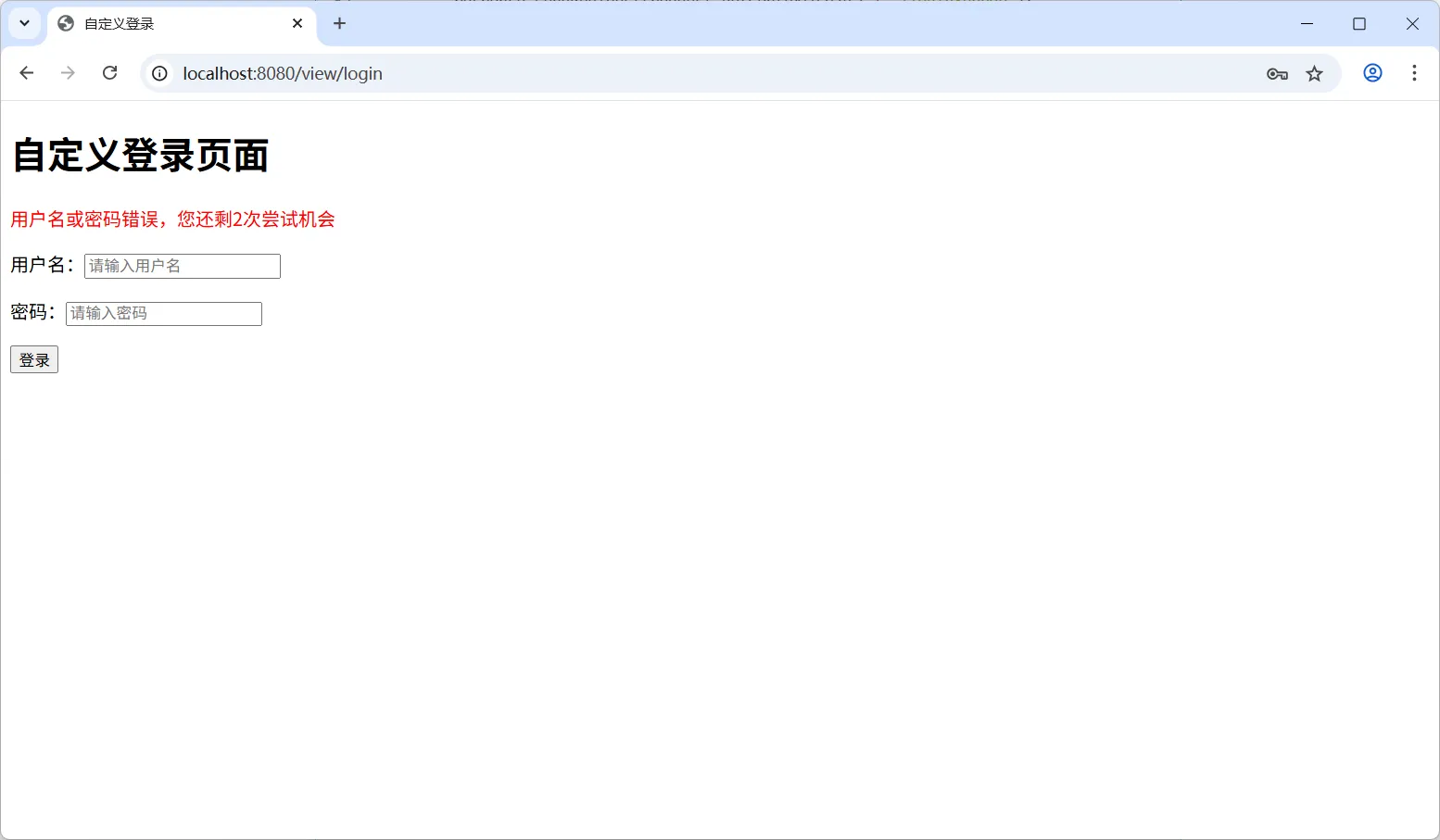
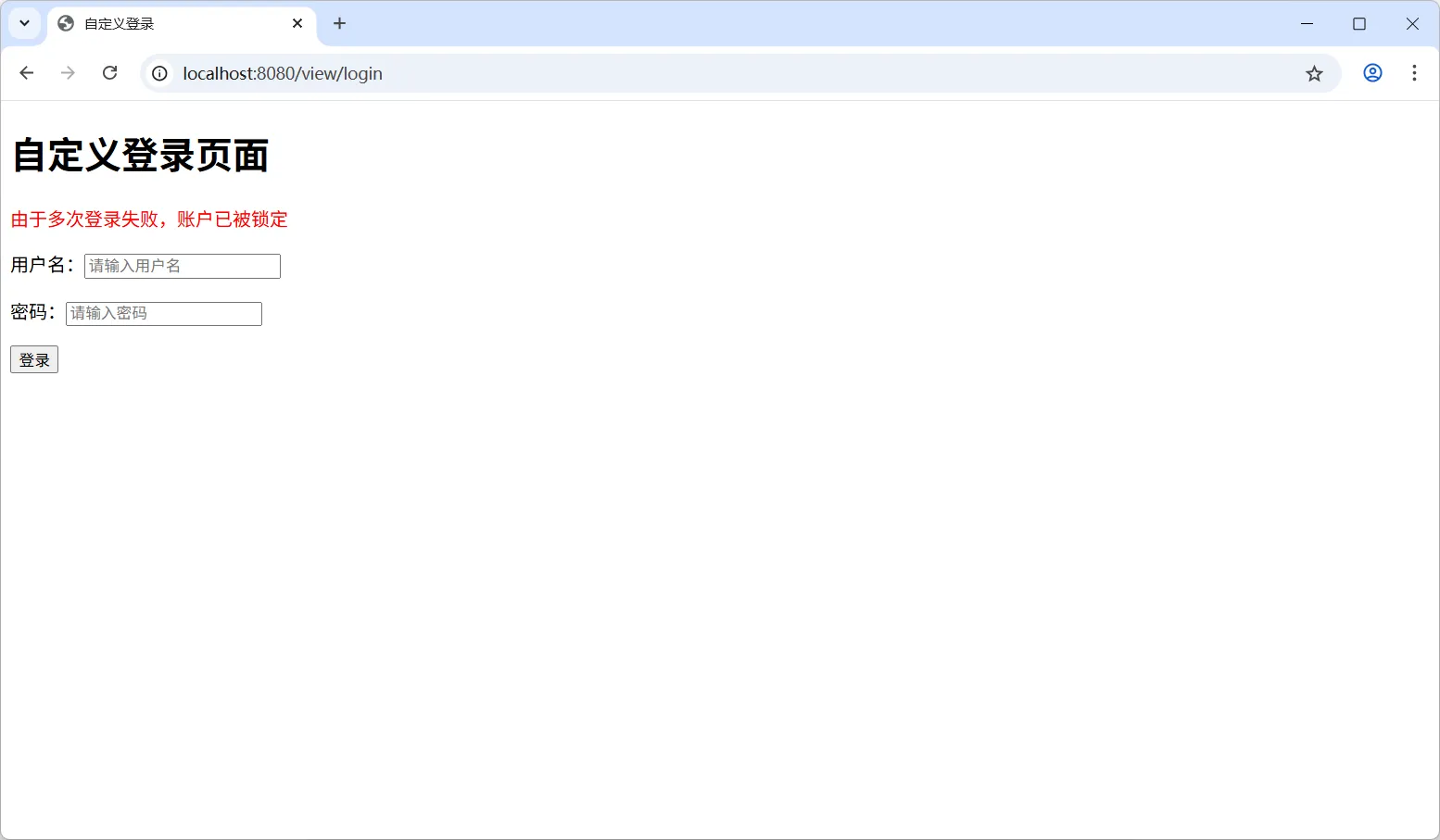
注意,上面仅仅添加了账号锁定功能,还需要添加账号锁定后自定解锁到功能,如账号锁定 30 分钟后自动解锁,读者自行实现。
记录登录失败日志
在实际应用中,记录登录失败日志对于安全审计非常重要。可以结合 SLF4J 或其他日志框架来记录详细的登录失败信息,如下:
package com.hxstrive.spring_security.customer;

import jakarta.servlet.ServletException;
import jakarta.servlet.http.HttpServletRequest;
import jakarta.servlet.http.HttpServletResponse;
import org.slf4j.Logger;
import org.slf4j.LoggerFactory;
import org.springframework.security.core.AuthenticationException;
import org.springframework.security.web.authentication.AuthenticationFailureHandler;
import org.springframework.stereotype.Component;
import java.io.IOException;
import java.time.LocalDateTime;

@Component
public class LoggingAuthenticationFailureHandler implements AuthenticationFailureHandler {
    private static final Logger logger = LoggerFactory.getLogger(LoggingAuthenticationFailureHandler.class);

    @Override
    public void onAuthenticationFailure(HttpServletRequest request, HttpServletResponse response,
                                        AuthenticationException exception) throws IOException, ServletException {
        String username = request.getParameter("username");
        String ipAddress = request.getRemoteAddr(); // IP地址
        LocalDateTime loginTime = LocalDateTime.now(); // 时间

        // 记录详细的登录失败日志
        logger.warn("登录失败 - 用户名: {}, IP地址: {}, 时间: {}, 原因: {}",
                username, ipAddress, loginTime, exception.getMessage());

        // 其他处理逻辑...
        response.sendRedirect(request.getContextPath() + "/login?error");
    }
}
当然,你也可以通过数据库来保存登陆日志,读者自行尝试。
spring 广告位
源码分析
转发源码分析
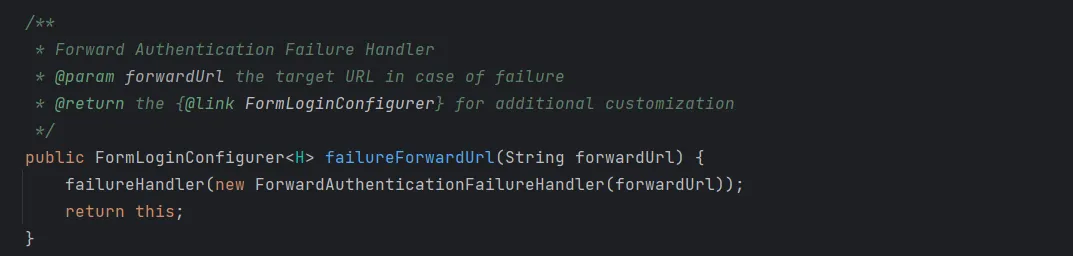
登陆失败转发 failureForwardUrl() 方法内部调用的是 failureHandler() 方法,如下图:
继续查看 ForwardAuthenticationFailureHandler 类的源码,如下图:
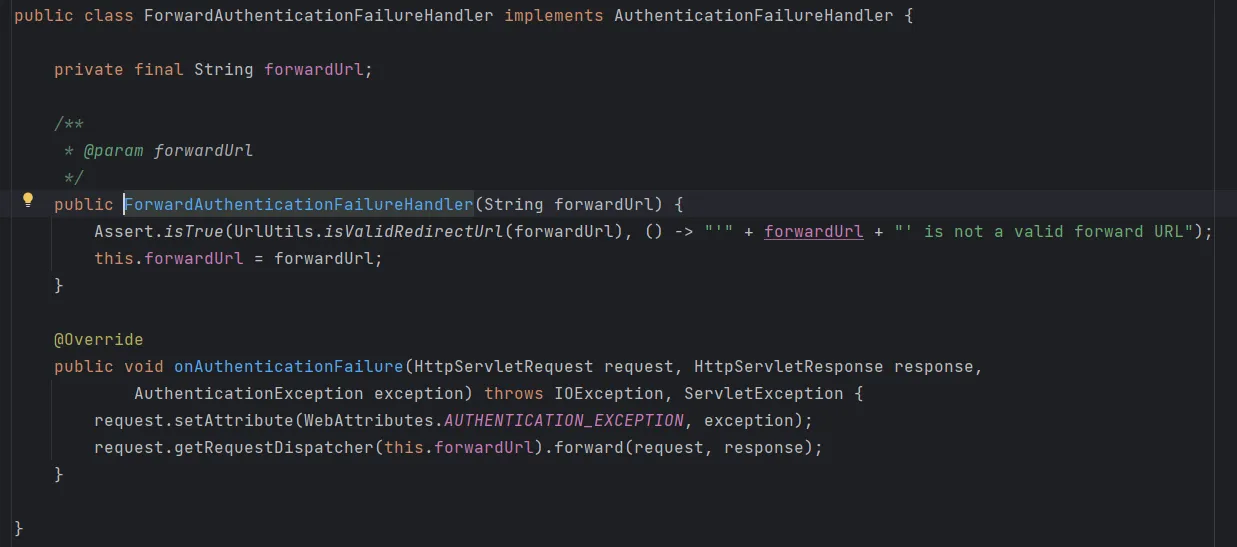
上述源码中,请求通过 request.getRequestDispatcher(this.forwardUrl).forward(request, response) 转发,并在 request 作用域中设置 Key 为 WebAttributes.AUTHENTICATION_EXCEPTION 的内容为异常对象。
WebAttributes.AUTHENTICATION_EXCEPTION 定义如下:

重定向源码分析
登陆失败重定向 failureUrl() 方法内部也是调用 failureHandler() 方法,如下图:
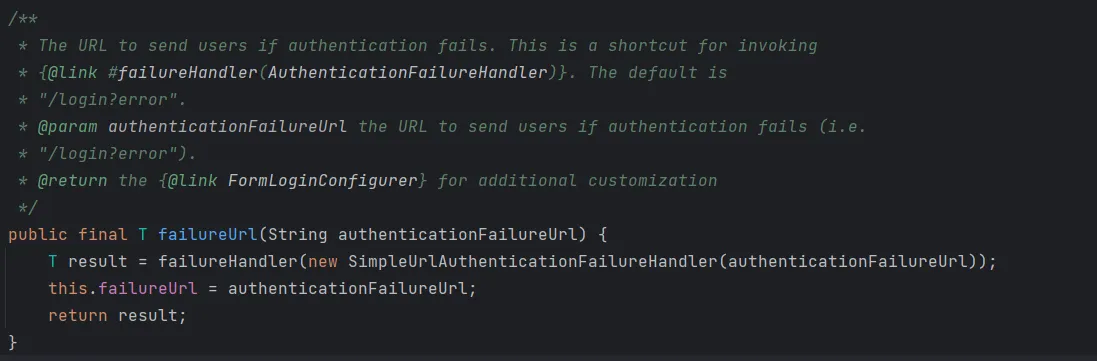
继续查看 SimpleUrlAuthenticationFailureHandler 类到源码,如下图:
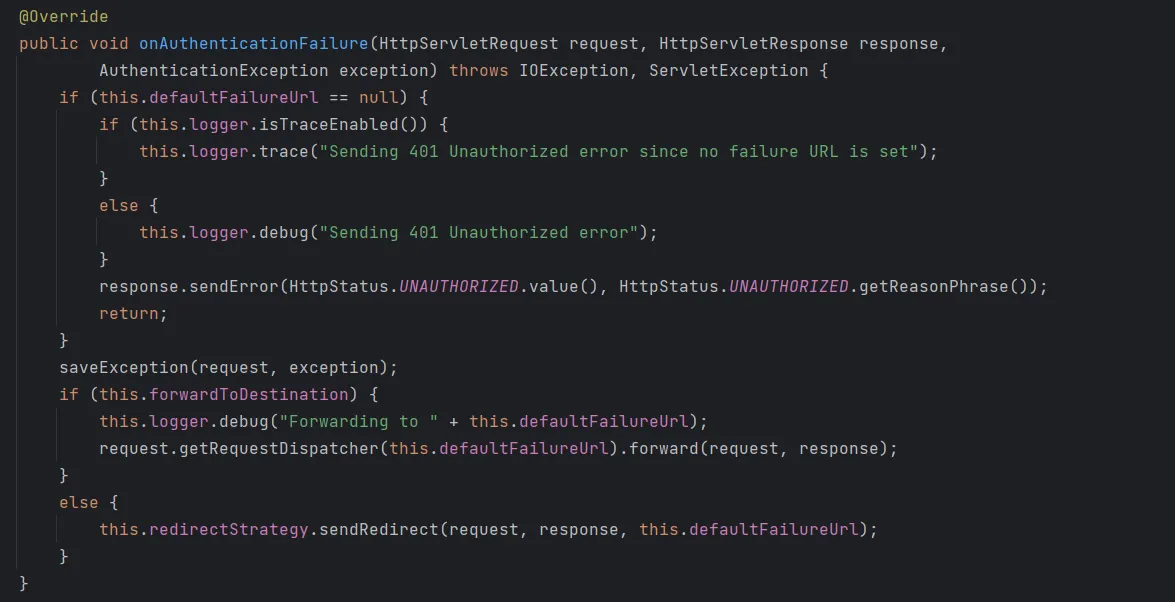
上述代码,如果设置了 defaultFailureUrl,则执行重定向或转发到该地址,否则返回 401 错误代码。如果进行重定向或转发,将调用 saveException 来缓存异常,以便在目标视图中使用。


 川公网安备51010802032098