利用 HTML + CSS 实现大学的课程表,效果如下图:
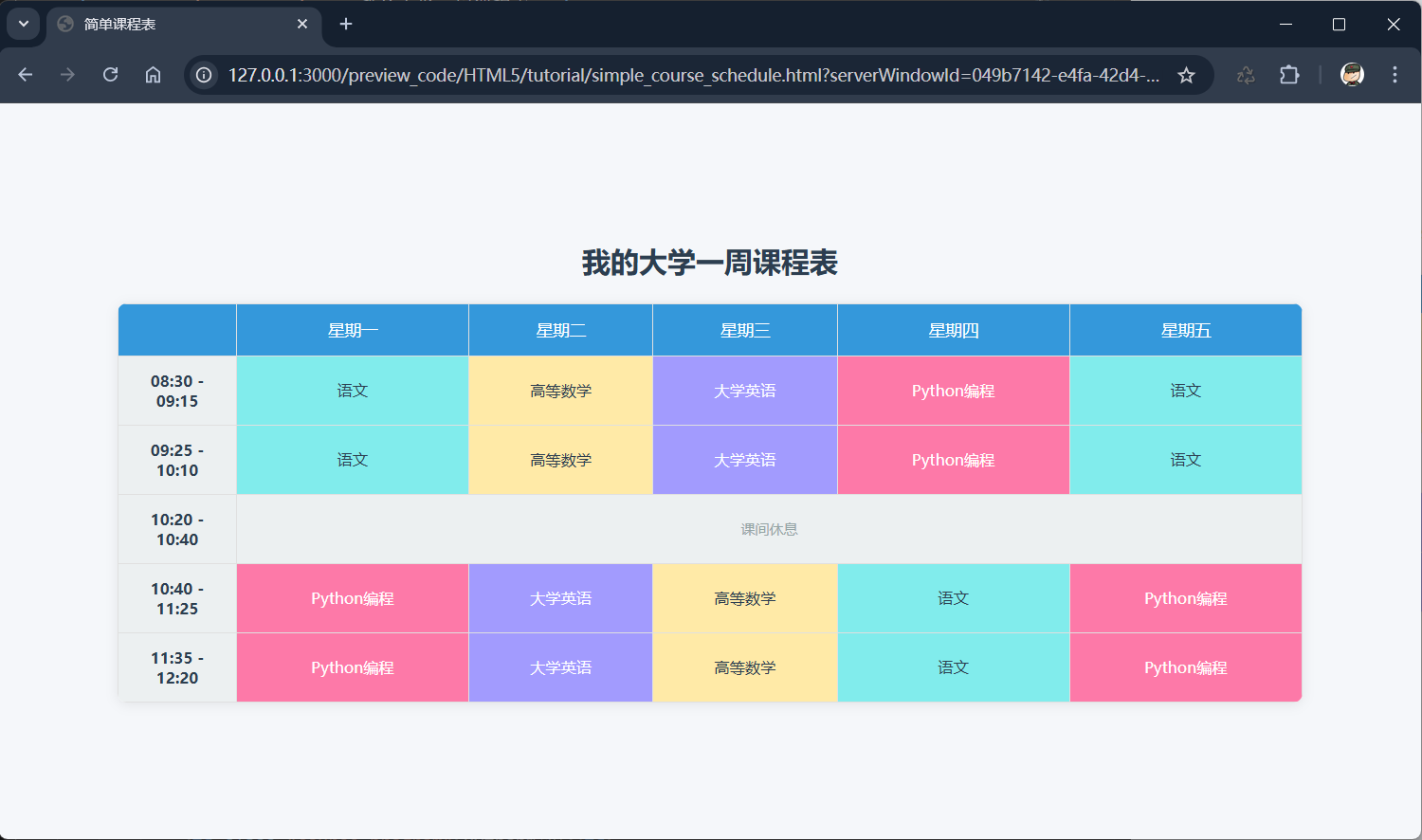
完整实例
示例:
<!DOCTYPE html>
<html lang="zh-CN">
<head>
    <meta charset="UTF-8">
    <meta name="viewport" content="width=device-width, initial-scale=1.0">
    <title>简单课程表</title>
    <style>
        /* 全局样式重置,消除默认边距和间距 */
        * {
            margin: 0;
            padding: 0;
            box-sizing: border-box;
            font-family: "Microsoft YaHei", sans-serif;
        }

        /* 页面整体布局,让课程表居中显示 */
        body {
            background-color: #f5f7fa;
            padding: 20px;
            display: flex;
            flex-direction: column;
            align-items: center;
            justify-content: center;
            min-height: 100vh;
        }

        /* 课程表标题样式 */
        .timetable-title {
            font-size: 24px;
            color: #2c3e50;
            margin-bottom: 20px;
            font-weight: bold;
        }

        /* 核心:课程表表格样式 */
        .timetable {
            border-collapse: collapse; /* 合并表格边框,避免双重边框 */
            width: 90%;
            max-width: 1000px; /* 限制最大宽度,大屏下不拉伸过度 */
            background-color: #ffffff;
            border-radius: 8px; /* 表格圆角 */
            overflow: hidden; /* 隐藏圆角外的内容,让边框圆角生效 */
            box-shadow: 0 2px 10px rgba(0, 0, 0, 0.08); /* 轻微阴影,提升立体感 */
        }

        /* 表格单元格通用样式(表头+表体) */
        .timetable th, .timetable td {
            border: 1px solid #e0e0e0;
            padding: 12px 8px;
            text-align: center;
            vertical-align: middle;
        }

        /* 表头样式(星期栏 + 时间段标题栏) */
        .timetable th {
            background-color: #3498db;
            color: #ffffff;
            font-weight: 500;
            font-size: 14px;
        }

        /* 左侧时间段列样式 */
        .timetable .time-col {
            background-color: #ecf0f1;
            color: #2c3e50;
            font-weight: bold;
            font-size: 13px;
            width: 100px; /* 固定时间段列宽度 */
        }

        /* 课程单元格样式 */
        .timetable .course {
            background-color: #f8f9fa;
            font-size: 13px;
            color: #2c3e50;
            transition: background-color 0.3s ease; /* 悬停过渡效果 */
        }

        /* 不同课程添加区分背景色(可选,提升辨识度) */
        .timetable .course.math {
            background-color: #ffeaa7;
        }

        .timetable .course.chinese {
            background-color: #81ecec;
        }

        .timetable .course.english {
            background-color: #a29bfe;
            color: #ffffff;
        }

        .timetable .course.program {
            background-color: #fd79a8;
            color: #ffffff;
        }

        /* 课程单元格悬停效果 */
        .timetable .course:hover {
            opacity: 0.9;
            transform: scale(1.02); /* 轻微放大,提升交互感 */
        }

        /* 课间休息 */
        .break_time {
            background-color: #ecf0f1; color: #95a5a6; font-size: 12px;
        }

        /* 响应式适配:小屏幕下缩小字体和内边距 */
        @media (max-width: 768px) {
            .timetable th, .timetable td {
                padding: 8px 4px;
                font-size: 12px;
            }

            .timetable .time-col {
                width: 80px;
            }

            .timetable-title {
                font-size: 20px;
            }
        }
    </style>
</head>
<body>
    <!-- 课程表标题 -->
    <div class="timetable-title">我的大学一周课程表</div>

    <!-- 课程表核心表格 -->
    <table class="timetable">
        <thead>
            <tr>
                <!-- 第一列表头(空白,对应左侧时间段列) -->
                <th></th>
                <!-- 星期表头 -->
                <th>星期一</th>
                <th>星期二</th>
                <th>星期三</th>
                <th>星期四</th>
                <th>星期五</th>
            </tr>
        </thead>
        <tbody>
            <!-- 第1节课 -->
            <tr>
                <td class="time-col">08:30 - 09:15</td>
                <td class="course chinese">语文</td>
                <td class="course math">高等数学</td>
                <td class="course english">大学英语</td>
                <td class="course program">Python编程</td>
                <td class="course chinese">语文</td>
            </tr>
            <!-- 第2节课 -->
            <tr>
                <td class="time-col">09:25 - 10:10</td>
                <td class="course chinese">语文</td>
                <td class="course math">高等数学</td>
                <td class="course english">大学英语</td>
                <td class="course program">Python编程</td>
                <td class="course chinese">语文</td>
            </tr>
            <!-- 课间休息(可选,无课程) -->
            <tr>
                <td class="time-col">10:20 - 10:40</td>
                <td colspan="5" class="break_time">课间休息</td>
            </tr>
            <!-- 第3节课 -->
            <tr>
                <td class="time-col">10:40 - 11:25</td>
                <td class="course program">Python编程</td>
                <td class="course english">大学英语</td>
                <td class="course math">高等数学</td>
                <td class="course chinese">语文</td>
                <td class="course program">Python编程</td>
            </tr>
            <!-- 第4节课 -->
            <tr>
                <td class="time-col">11:35 - 12:20</td>
                <td class="course program">Python编程</td>
                <td class="course english">大学英语</td>
                <td class="course math">高等数学</td>
                <td class="course chinese">语文</td>
                <td class="course program">Python编程</td>
            </tr>
        </tbody>
    </table>
</body>
</html>
看看效果👉自己动手试一试 »


 川公网安备51010802032098