本章将介绍 jQuery 中的层级选择器, jQuery 中的层级选择器,包括 ancestor descendant(后代选择器)、parent > child(子元素选择器)、prev + next(相邻兄弟选择器)和 prev ~ siblings(通用兄弟选择器)这四种。
层级选择器
ancestor descendant(后代选择器)
后代选择器用于选中 ancestor(祖先元素)下所有层级的 descendant(后代元素)(包括子、孙、曾孙等所有嵌套层级)。
注意,后代选择器的范围广,包含所有嵌套层级的后代,是最常用的层级选择器。
语法:
// 两个选择器之间用空格分隔
$("祖先选择器 后代选择器")
注意事项:
祖先元素可以是任意选择器(ID、类、标签等),如 $("#parent span")、$("ul li");
空格是核心语法,无空格则变成 “复合选择器”(如 .containerp 是选中类为 containerp 的元素,而非后代);
适合需要选中某个容器内所有目标元素的场景(不管嵌套层级);
示例:
<div class="app">
    <h3>层级选择器</h3>
    <form>
        <label>Name:</label>
        <input type="text" name="name" placeholder="form input" />
        <fieldset>
            <label>Newsletter:</label>
            <input name="newsletter" placeholder="form fieldset input" />
        </fieldset>
    </form>
    <input type="text" name="none" placeholder="input" />
</div>
执行 $('form input') 代码,将选择如下元素:
<input type="text" name="name" placeholder="form input" />
<input name="newsletter" placeholder="form fieldset input" />
parent > child(子元素选择器)
该选择器仅选中 parent(父元素)下直接一级的 child(子元素),不包含孙元素及更深层级的元素。
注意,该选择器的范围精准,仅匹配直接子元素,效率比后代选择器更高(无需遍历所有嵌套层级)。
语法:
// 两个选择器之间用大于号 > 分隔
$("父选择器 > 子选择器")
注意事项:
示例:
<div class="app">
    <h3>层级选择器</h3>
    <form>
        <label>Name:</label>
        <input type="text" name="name" placeholder="form input" />
        <fieldset>
            <label>Newsletter:</label>
            <input name="newsletter" placeholder="form fieldset input" />
        </fieldset>
    </form>
    <input type="text" name="none" placeholder="input" />
</div>
执行 $('form > input') 代码,将选择如下元素:
<input type="text" name="name" placeholder="form input" />
prev + next(相邻兄弟选择器)
该选择器用于选中 prev(前一个元素)紧挨着的下一个同级兄弟元素(且匹配 next 选择器),仅匹配 “紧邻的一个”。
注意,该选择器精准匹配“相邻下一个”兄弟,适合“触发某个元素后,操作其紧邻的兄弟元素”的场景。
语法:
// 两个选择器之间用加号 + 分隔
$("前元素选择器 + 后元素选择器")
注意事项:
示例:
<div class="app">
    <h3>层级选择器</h3>
    <form>
        <label>Name:</label>
        <input type="text" name="name" placeholder="form input" />
        <fieldset>
            <label>Newsletter:</label>
            <input name="newsletter" placeholder="form fieldset input" />
        </fieldset>
    </form>
    <input type="text" name="none" placeholder="input" />
</div>
执行 $('label + input') 代码,将选择如下元素:
<input type="text" name="name" placeholder="form input" />
<input name="newsletter" placeholder="form fieldset input" />
prev ~ siblings(通用兄弟选择器)
该选择器用于选中 prev(前一个元素)之后的所有同级兄弟元素(且匹配 siblings 选择器),包含多个符合条件的兄弟。
匹配 “prev 之后的所有同级兄弟”,范围比相邻兄弟选择器广。
语法:
// 两个选择器之间用波浪号 ~ 分隔
$("前元素选择器 ~ 兄弟选择器")
注意事项:
示例:
<div class="app">
    <h3>层级选择器</h3>
    <form>
        <label>Name:</label>
        <input type="text" name="name" placeholder="form input" />
        <fieldset>
            <label>Newsletter:</label>
            <input name="newsletter" placeholder="form fieldset input" />
        </fieldset>
    </form>
    <input type="text" name="none" placeholder="input1" />
    <input type="text" name="none" placeholder="input2" />
    <input type="text" name="none" placeholder="input3" />
</div>
运行 $('form ~ input') 代码,将选中如下元素:
<input type="text" name="none" placeholder="input1" />
<input type="text" name="none" placeholder="input2" />
<input type="text" name="none" placeholder="input3" />
jQuery广告
演示示例
下面通过一个示例演示各个选择器的含义,通过为选中的元素添加样式,直观查看个基本选择器的效果。
示例:
<html>
<head>
    <meta charset="UTF-8">
    <meta name="viewport" content="width=device-width, initial-scale=1.0">
    <title>JQeury 教程:选择器</title>
    <!-- 引入 jQuery 库 -->
    <script type="text/javascript" src="https://www.hxstrive.com/cdn/libs/jquery/3.7.1/jquery.min.js"></script>
    <!-- 引入 loglevel 库,方便在 DOM 中打印日志 -->
    <script src="https://www.hxstrive.com/preview_code/libs/custom_loglevel.js"></script>
    <style>
        div { margin:20px; }
        button { background: #EEE !important; border: 1px solid #ccc !important;
             min-width: 40px; padding: 5px; margin: 5px; cursor: pointer; }
        sup {color: red; font-size: 12px;}
        form { padding:5px;border:solid 1px blue; }
        fieldset { margin-top:8px; }

        /* 效果样式 */
        .myClass {
            box-shadow: inset 0 0 5px red;
        }
    </style>
</head>
<body>

    <div>
        <h3>层级选择器</h3>
        <form>
            <label>Name:</label>
            <input type="text" name="name" placeholder="form input" />
            <fieldset>
                <label>Newsletter:</label>
                <input name="newsletter" placeholder="form fieldset input" />
            </fieldset>
        </form>
        <input type="text" name="none" placeholder="input1" />
        <input type="text" name="none" placeholder="input2" />
        <input type="text" name="none" placeholder="input3" />
    </div>
    <div>
        <!-- ancestor descendant  在给定的祖先元素下匹配所有的后代元素 -->
        <button type="button" onclick="
                reset();
                // 选择器使用
                $('form input').addClass('myClass');
            ">form input</button>

        <!-- parent > child  在给定的父元素下匹配所有的直接子元素 -->
        <button type="button" onclick="
                reset();
                // 选择器使用
                $('form > input').addClass('myClass');
            ">form > input</button>

        <!-- prev + next  匹配所有紧接在 prev 元素后的 next 元素 -->
        <button type="button" onclick="
                reset();
                // 选择器使用
                $('label + input').addClass('myClass');
            ">label + input</button>

        <!-- prev ~ siblings  匹配 prev 元素之后的所有 siblings 元素 -->
        <button type="button" onclick="
                reset();
                // 选择器使用
                $('form ~ input').addClass('myClass');
            ">form ~ input</button>
    </div>

    <script>
        function reset() {
            $("*").removeClass("myClass");
        }
    </script>

</body>
</html>
看看效果👉自己动手试一试 »
运行示例,点击“form input”按钮,选择 form 表单下面所有的 input 标签,效果如下图:
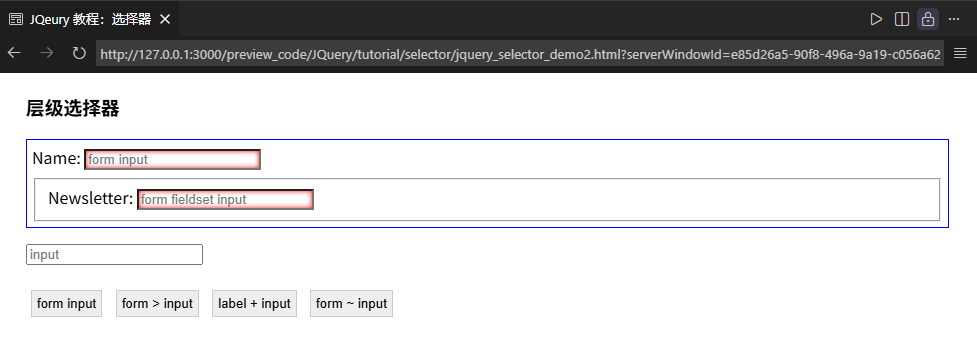
你可以点击其他按钮,查看其他选择器的效果。
更多关于 jQuery 的知识请阅读后续教程。


 川公网安备51010802032098