Python 中 subprocess 是一个内置的、官方推荐的进程创建模块,专门用于启动新的系统进程、执行系统命令、调用外部程序,并可以获取命令的输入、输出、错误信息、返回码,可以完全替代了旧的 os.system、os.popen 等模块。
subprocess 主要用于:
常用方法
subprocess.run()
用于执行命令,等待命令完成,返回包含执行结果的对象。方法定义如下:
subprocess.run(args, *, stdin=None, input=None, stdout=None, stderr=None,
    capture_output=False, shell=False, cwd=None, timeout=None, check=False,
    encoding=None, errors=None, text=None, env=None,
    universal_newlines=None, **other_popen_kwargs)
参数说明:
None(默认,继承父进程)
subprocess.PIPE:需要手动传入输入
subprocess.DEVNULL:丢弃输入
stdout=subprocess.PIPE
stderr=subprocess.PIPE
不用自己写两个 PIPE 了,更简洁
cwd:指定命令的工作目录,命令会在这个目录下执行,例如:cwd="/home/user"
timeout:命令超时时间(秒),超时会抛出 TimeoutExpired 异常
check:如果命令返回码 ≠ 0,直接抛 CalledProcessError 异常,避免手动判断 returncode
encoding:指定编码(如 utf-8),开启后,输出自动从 bytes 转换为字符串
errors:编码错误处理策略(如 strict, ignore, replace)
text / universal_newlines:text=True 表示输出以字符串 str 返回,text=False 表示输出以 bytes 返回,universal_newlines 是别名,效果一样。
env:指定子进程的环境变量,不传则继承当前进程环境变量,可自定义 PATH、LANG 等。
universal_newlines:同 text,Python 兼容旧写法,推荐用 text=True
**other_popen_kwargs:传给底层 Popen 的额外参数
Python广告
subprocess.Popen
用于异步方式启动进程,不等待执行完成,可实时读取输出、发送输入、手动等待。
其他常用辅助
subprocess.CalledProcessError:命令执行失败异常
subprocess.TimeoutExpired:命令超时异常
简单示例
示例 1:最简单执行命令
不捕获输出,使用 subprocess.run() 方法运行 Windows 系统的 dir 或者 Linux 系统的 ls 命令,代码如下:
import subprocess
import sys

if sys.platform.startswith("linux"):
    # Linux
    subprocess.run("ls")

elif sys.platform == "win32":
    # Windows
    subprocess.run(["dir"], shell=True)

else:
    print("其他系统:", sys.platform)
运行结果(出现乱码):
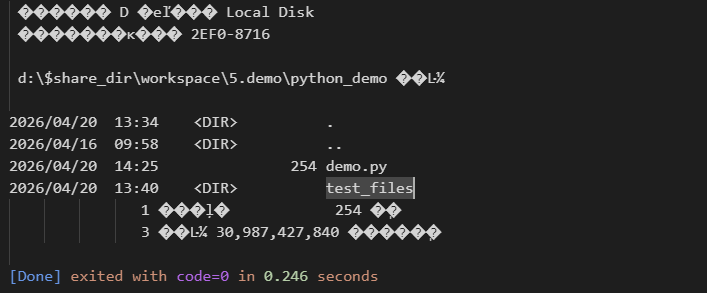
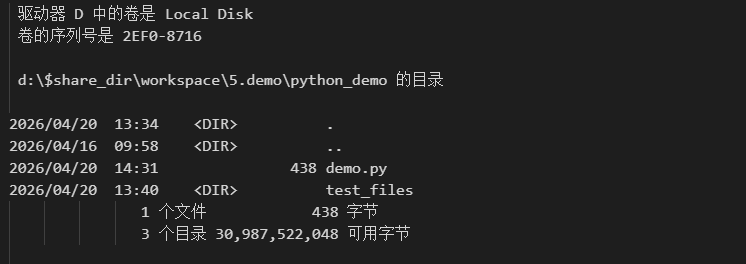
通过指定 encoding、text 和 capture_output 参数解决乱码问题:
import subprocess
import sys

if sys.platform.startswith("linux"):
    # Linux
    subprocess.run("ls")

elif sys.platform == "win32":
    # Windows
    # subprocess.run(["dir"], shell=True)
    # subprocess.run(["cmd", "/c", "dir"]) # 出现乱码
    result = subprocess.run(["cmd", "/c", "dir"], capture_output=True, text=True, encoding="GBK")
    print(result.stdout)
else:
    print("其他系统:", sys.platform)
运行结果:
示例 2:捕获命令输出
使用 subprocess.run() 函数执行 ping 命令,捕获输出信息,通过 print() 打印,例如:
import subprocess

# 捕获标准输出 + 字符串模式
result = subprocess.run(
    ["ping", "127.0.0.1"],   # 命令用列表更安全
    stdout=subprocess.PIPE,  # 捕获输出
    stderr=subprocess.PIPE,  # 捕获错误
    text=True,               # 返回字符串
    timeout=5                # 5秒超时
)

# 查看结果
print("返回码:", result.returncode)  # 0=成功,非0=失败
print("输出内容:\n", result.stdout)
print("错误信息:", result.stderr)
运行结果:
返回码: 0
输出内容:

正在 Ping 127.0.0.1 具有 32 字节的数据:
来自 127.0.0.1 的回复: 字节=32 时间<1ms TTL=128
来自 127.0.0.1 的回复: 字节=32 时间<1ms TTL=128
来自 127.0.0.1 的回复: 字节=32 时间<1ms TTL=128
来自 127.0.0.1 的回复: 字节=32 时间<1ms TTL=128

127.0.0.1 的 Ping 统计信息:
    数据包: 已发送 = 4,已接收 = 4,丢失 = 0 (0% 丢失),
往返行程的估计时间(以毫秒为单位):
    最短 = 0ms,最长 = 0ms,平均 = 0ms

错误信息:
示例 3:执行失败自动抛异常(check=True)
使用 subprocess.run() 执行 dir 命令,查看一个不存在的 test_folder 目录,抛出错误然后捕获,例如:
import subprocess

# 命令错误时直接抛异常,避免手动判断 returncode
try:
    result = subprocess.run(
        ["cmd", "/c", "dir", "test_folder"],
        check=True,
        stdout=subprocess.PIPE,
        stderr=subprocess.PIPE,
        text=True,
        encoding="gbk",
        timeout=10
    )
    print(result.stdout)
except subprocess.CalledProcessError as e:
    print("命令执行失败!")
    print("错误信息:", e.stderr)
运行结果:
命令执行失败!
错误信息: 找不到文件
示例 4:使用 shell 执行命令
subprocess.run () 函数中,通过设置 shell 参数为 True 来执行系统命令,可以原生支持命令行中的管道操作、通配符匹配等常见的 shell 特性,从而更灵活地完成复杂的命令调用与数据处理任务。例如:
import subprocess
import sys

if sys.platform.startswith("linux"):
    # Linux/Mac
    subprocess.run("ps aux | grep python", shell=True, text=True)

elif sys.platform == "win32":
    # Windows:查看进程并搜索
    subprocess.run("tasklist | findstr python", shell=True, text=True)

else:
    print("其他系统:", sys.platform)
运行结果:
python3.13t.exe 4668 Console 2 16,052 K
示例 5:指定工作目录执行命令
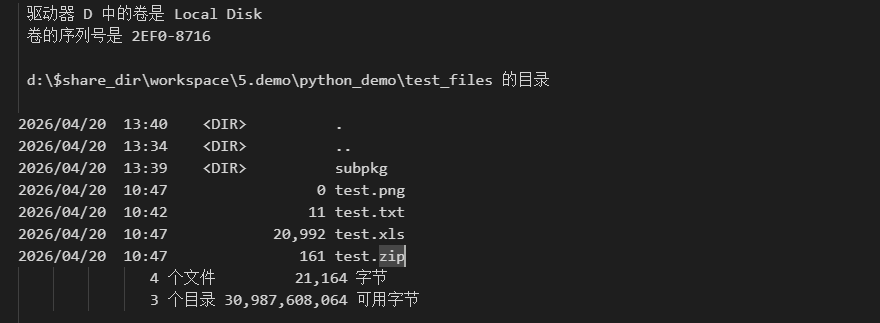
使用 cwd 参数为 subprocess.run() 指定工作目录,例如:
import subprocess
import sys

if sys.platform == "win32":
    # 设置工作目录为当前目录下的 test_files 目录
    result = subprocess.run(["cmd", "/c", "dir"], cwd=r".\\test_files",
                            stdout=subprocess.PIPE, stderr=subprocess.PIPE, text=True, encoding="GBK")
    print(result.stdout)
else:
    print("其他系统:", sys.platform)
运行结果:
示例 6:实时读取输出
可以使用 Popen 方法实现实时读取输出,该种方式适合运行持续输出日志的程序,例如 ffmpeg、ping -t 命令,代码如下:
import subprocess

# 启动进程
proc = subprocess.Popen(
    "ping 127.0.0.1 -n 5",
    stdout=subprocess.PIPE,
    stderr=subprocess.PIPE,
    text=True,
    shell=True
)

# 实时逐行读取输出
for line in proc.stdout:
    print("实时输出:", line.strip())

# 等待结束并获取返回码
proc.wait()
print("最终返回码:", proc.returncode)
运行结果:

Python广告
示例 7:给子进程发送输入
使用 stdin 向子进程输入数据,例如:
import subprocess

proc = subprocess.Popen(
    "cmd",                # Windows
    # "bash",             # Linux/Mac
    stdin=subprocess.PIPE,
    stdout=subprocess.PIPE,
    stderr=subprocess.PIPE,
    text=True
)

# 向命令行输入指令
# dir   列出当前目录文件
# exit  退出命令行
out, err = proc.communicate(input="dir\nexit\n")
print(out)
运行结果:
Microsoft Windows [版本 10.0.26200.8246]
(c) Microsoft Corporation。保留所有权利。

d:\$share_dir\workspace\5.demo\python_demo>dir
 驱动器 D 中的卷是 Local Disk
 卷的序列号是 2EF0-8716

 d:\$share_dir\workspace\5.demo\python_demo 的目录

2026/04/20  13:34    <DIR>          .
2026/04/16  09:58    <DIR>          ..
2026/04/20  15:41               376 demo.py
2026/04/20  13:40    <DIR>          test_files
               1 个文件            376 字节
               3 个目录 30,762,098,688 可用字节

d:\$share_dir\workspace\5.demo\python_demo>exit


[Done] exited with code=0 in 0.268 seconds
实战:系统信息自动检测工具
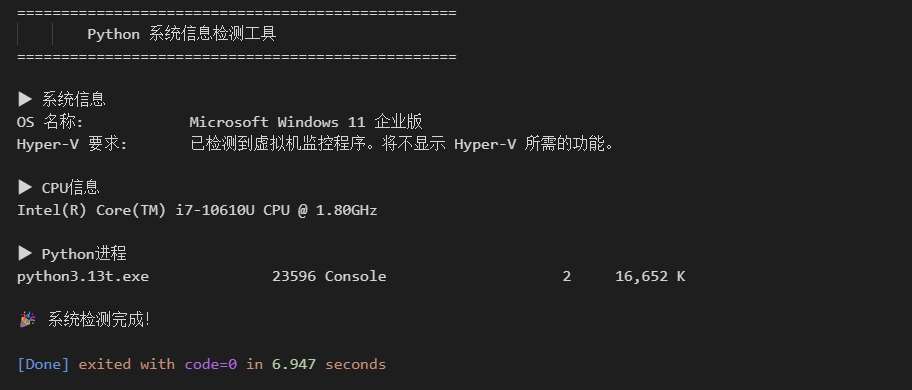
该示例将执行多条系统命令,捕获这些系统命令的输出、错误、返回码,然后生成格式化报告。
完整代码:
import subprocess
import sys

def run_command(cmd, timeout=10):
    """
    执行系统命令,返回 输出、错误、返回码
    """
    try:
        result = subprocess.run(
            cmd,
            stdout=subprocess.PIPE,
            stderr=subprocess.PIPE,
            text=True,
            shell=True,
            timeout=timeout
        )

        return {
            "success": result.returncode == 0,
            "output": result.stdout,
            "error": result.stderr,
            "code": result.returncode
        }
    except subprocess.TimeoutExpired:
        return {"success": False, "error": "命令超时", "code": -1}
    except Exception as e:
        return {"success": False, "error": str(e), "code": -2}

def system_check():
    """
    系统检查主函数
    """
    print("=" * 50)
    print("        Python 系统信息检测工具")
    print("=" * 50)

    # 判断系统,为不同系统准备不同的命令
    if sys.platform == "win32":
        commands = {
            "系统信息": "systeminfo | findstr /c:\"OS 名称\" /c:\"物理内存总量\" /c:\"Hyper-V 要求\"",
            "CPU信息": ["powershell", "(Get-WmiObject Win32_Processor).Name"],
            "Python进程": "tasklist | findstr python"
        }
    else:
        commands = {
            "系统信息": "uname -a",
            "CPU信息": "lscpu | grep 'Model name'",
            "Python进程": "ps aux | grep python"
        }

    # 循环执行定义的命令
    for name, cmd in commands.items():
        print(f"\n▶ {name}")
        res = run_command(cmd)
        if res["success"]:
            print(res["output"].strip())
        else:
            print(f"失败:{res['error']}")

    print("\n🎉 系统检测完成!")

if __name__ == "__main__":
    system_check()
运行结果:
更多关于 subprocess 模块的更多信息,请阅读 https://docs.python.org/3/library/subprocess.html 官方文档。


 川公网安备51010802032098