要提升 Chroma 性能,我们非常有必要了解过滤到底是怎么执行的,因为它能决定你的系统能不能扛住访问、过滤效率等。
倒排索引
Chroma 1.x 默认给 metadata 的每个 key 建了倒排索引。我用 sqlite 打开真实库看 collections 集合的 schema_str 列的值,如下图:
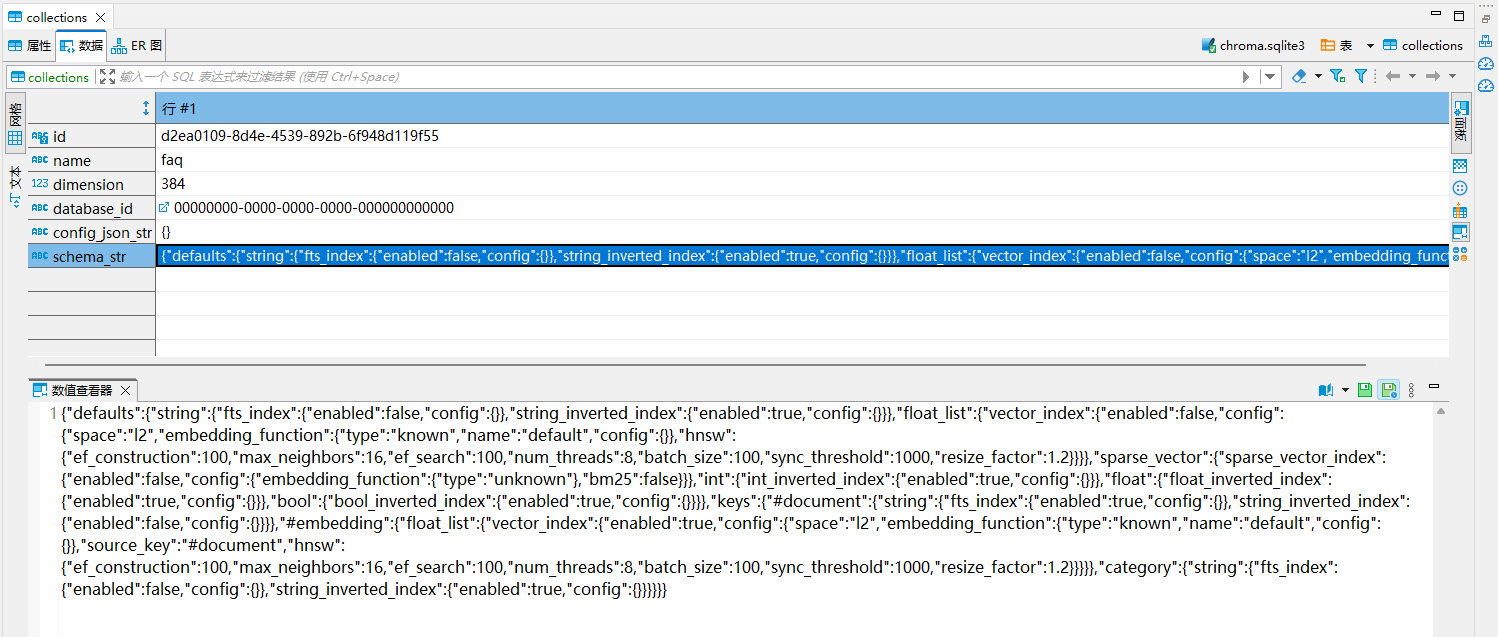
将值进行格式化,如下:
{
    "defaults": {
        "string": {
            "fts_index": {
                "enabled": false, "config": {}
            },
            "string_inverted_index": {
                "enabled": true, "config": {}
            }
        },
        "float_list": {
            "vector_index": {
                "enabled": false,
                "config": {
                    "space": "l2",
                    "embedding_function": {
                        "type": "known",
                        "name": "default",
                        "config": {}
                    },
                    "hnsw": {
                        "ef_construction": 100,
                        "max_neighbors": 16,
                        "ef_search": 100,
                        "num_threads": 8,
                        "batch_size": 100,
                        "sync_threshold": 1000,
                        "resize_factor": 1.2
                    }
                }
            }
        },
        "sparse_vector": {
            "sparse_vector_index": {
                "enabled": false,
                "config": {
                    "embedding_function": {
                        "type": "unknown"
                    },
                    "bm25": false
                }
            }
        },
        "int": {
            "int_inverted_index": {
                "enabled": true, "config": {}
            }
        },
        "float": {
            "float_inverted_index": {
                "enabled": true,
                "config": {}
            }
        },
        "bool": {
            "bool_inverted_index": {
                "enabled": true, "config": {}
            }
        }
    },
    "keys": {
        "#document": {
            "string": {
                "fts_index": {
                    "enabled": true, "config": {}
                },
                "string_inverted_index": {
                    "enabled": false, "config": {}
                }
            }
        },
        "#embedding": {
            "float_list": {
                "vector_index": {
                    "enabled": true,
                    "config": {
                        "space": "l2",
                        "embedding_function": {
                            "type": "known",
                            "name": "default",
                            "config": {}
                        },
                        "source_key": "#document",
                        "hnsw": {
                            "ef_construction": 100,
                            "max_neighbors": 16,
                            "ef_search": 100,
                            "num_threads": 8,
                            "batch_size": 100,
                            "sync_threshold": 1000,
                            "resize_factor": 1.2
                        }
                    }
                }
            }
        },
        "category": {
            "string": {
                "fts_index": {
                    "enabled": false, "config": {}
                },
                "string_inverted_index": {
                    "enabled": true, "config": {}
                }
            }
        }
    }
}
上面配置中,xxx_inverted_index 表示倒排索引,如果内部的 enabled 为 true,则表示倒排索引开启,false 则表示没有开启。fts_index 表示全文索引状态,true 表示开启。
默认的索引配置大概是:
string  -> string_inverted_index: enabled
int     -> int_inverted_index:  enabled
float   -> float_inverted_index: enabled
bool    -> bool_inverted_index:  enabled
#document -> fts_index: enabled, string_inverted_index: disabled 全文索引开启,倒排索引关闭
也就是说 where 走的是倒排索引,不是全表扫,速度还行。
pre-filter 的陷阱
回忆一下第 5 章说的:query 的过滤是先过滤、再检索。
问题在于 HNSW 索引是按“向量相似度”建的图,它不知道你的过滤条件。当你过滤掉 90% 的数据后,图上大量邻居都被排除了,HNSW 的导航能力急剧下降,结果是:
这就是经典的 "pre-filtering problem"。
怎么判断自己中招了:同一个 query,加过滤和不加过滤,对比一下返回的距离值。如果加过滤后最相似的 distance 明显变大,说明召回质量下降。
怎么缓解:
让过滤条件宽一点。如果过滤后候选集仍然有几千条以上,HNSW 一般还能工作。
过滤条件很严时(比如只剩几十条),改成先 get 再自己算相似度。候选集小的时候暴力算反而更快更准:
import numpy as np
import chromadb


def search_then_filter(col, query_vec, where, top_k=10):
    """过滤后候选集很小时,用 get + 暴力算,比 query 的 pre-filter 更准"""
    res = col.get(where=where, include=["embeddings"])
    if not res["ids"]:
        return []

    mat = np.array(res["embeddings"], dtype=np.float32)   # (N, D)
    q = np.array(query_vec, dtype=np.float32)

    # cosine 距离
    mat_norm = mat / (np.linalg.norm(mat, axis=1, keepdims=True) + 1e-12)
    q_norm = q / (np.linalg.norm(q) + 1e-12)
    dists = 1.0 - mat_norm @ q_norm

    order = np.argsort(dists)[:top_k]
    return [(res["ids"][i], float(dists[i])) for i in order]


if __name__ == "__main__":
    client = chromadb.Client()
    coll = client.get_or_create_collection(name="demo_post_filter")

    # 构造测试数据:6条向量,附带元数据category
    dim = 4
    ids = [f"doc_{i}" for i in range(6)]
    embeddings = np.random.randn(6, dim).tolist()
    metadatas = [
        {"category": "python", "source": "book"},
        {"category": "python", "source": "web"},
        {"category": "java", "source": "book"},
        {"category": "python", "source": "book"},
        {"category": "go", "source": "web"},
        {"category": "python", "source": "web"},
    ]
    documents = ["dummy"] * 6

    coll.add(ids=ids, embeddings=embeddings, metadatas=metadatas, documents=documents)

    # 构造查询向量
    query_emb = np.random.randn(dim).tolist()

    # 调用函数:只在 category="python" 的集合里做相似度搜索
    where_condition = {"category": "python"}
    result = search_then_filter(
        col=coll,
        query_vec=query_emb,
        where=where_condition,
        top_k=3
    )

    print("=== Post-Filter 搜索结果(id, cos距离)===")
    for doc_id, dist in result:
        print(f"{doc_id} | cos_dist = {dist:.4f}")

    # 复杂where条件示例(嵌套$and / $or)
    where_complex = {
        "$and": [
            {"category": "python"},
            {"source": "book"}
        ]
    }
    result2 = search_then_filter(coll, query_emb, where_complex, top_k=2)
    print("\n=== 复合where条件结果 ===")
    for doc_id, dist in result2:
        print(f"{doc_id} | cos_dist = {dist:.4f}")
运行结果如下:
=== Post-Filter 搜索结果(id, cos距离)===
doc_1 | cos_dist = 0.3138
doc_0 | cos_dist = 0.3201
doc_5 | cos_dist = 0.8990

=== 复合where条件结果 ===
doc_0 | cos_dist = 0.3201
doc_3 | cos_dist = 1.7290
这个函数我在“限定在某个文档内检索”的场景里一直在用 —— 一个文档最多几百个分片,暴力算几毫秒就完事,而且零召回损失。
把过滤条件编码进集合。比如按租户/业务线拆成多个小集合,检索时直接选集合,连过滤都不用。缺点是集合数会膨胀。
别在 metadata 里存大段文本
metadata 是要建索引的,你塞一整段正文进去,索引体积爆炸、写入变慢,而且它本来也不该干这活。正文放 documents,metadata 只放短的、离散的、用于筛选的字段。


 川公网安备51010802032098