打着不乱花一分钱的态度,我决定使用本地 Ollama 来提供 LLM 大模型服务,使用 qwen3:4b 模型,足以应对当前示例场景。
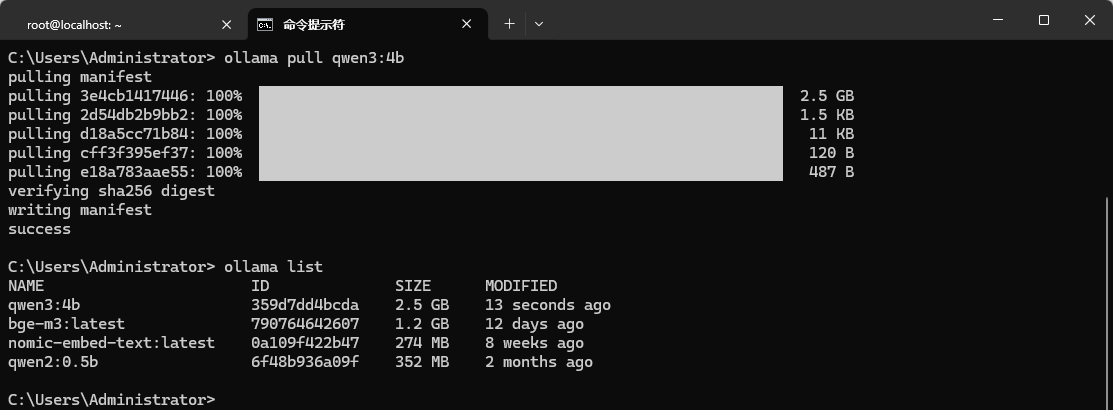
如果你还没有下载 qwen3:4b 模型,可以运行 ollama pull qwen3:4b 命令去下载,下载后如下图:
代码如下,将 LLM 能力封装在 OpenAILLM 类中,通过调用 complate() 函数实现人机对话:
class OpenAILLM:
    def __init__(self, model="qwen3:4b", base_url="http://localhost:11434"):
        import httpx
        self.model = model
        self.client = httpx.Client(
            timeout=httpx.Timeout(connect=5.0, read=300.0, write=30.0, pool=None),
            headers={"Content-Type": "application/json"},
        )
        self.base_url = base_url.rstrip("/")

    def complete(self, prompt: str) -> str:
        r = self.client.post(
            f"{self.base_url}/api/chat",
            json={
                "model": self.model,
                "messages": [{"role": "user", "content": prompt}],
                "options": {"temperature": 0.2},
                "stream": False,
            },
        )
        r.raise_for_status()
        return r.json()["message"]["content"]


# 验证功能,单独执行才会运行哦
if __name__ == "__main__":
    llm = OpenAILLM()
    print(llm.complete("你好,世界"))
运行代码,验证 LLM 是否可用,输出如下:
你好!有什么我可以帮助你的吗?😊
能用就行,如果你本地机器硬件较差,下面版本也封装了千问、AiCore API 版本,完整代码如下:
from abc import ABC, abstractmethod
from dotenv import load_dotenv

# 加载 .env,默认不覆盖系统已有环境变量
load_dotenv()

class AILLM(ABC):
    """LLM 能力统一接口:所有具体 LLM 实现都必须提供 complete 方法。

    这样在 RAGService 里可以直接替换底层模型,而不用改业务代码:
        llm = OllamaAILLM("qwen3:4b")   # 本地
        llm = OpenAILLM("gpt-4o-mini")  # OpenAI
        llm = QianWenAILLM("qwen-plus") # 通义千问
    """

    @abstractmethod
    def complete(self, prompt: str) -> str:
        """根据 prompt 生成回答,返回字符串。子类必须实现。"""
        raise NotImplementedError


class OllamaAILLM(AILLM):
    """Ollama 提供 LLM 服务"""
    def __init__(self, model="qwen3:4b", base_url="http://localhost:11434"):
        import httpx
        self.model = model
        self.client = httpx.Client(
            timeout=httpx.Timeout(connect=5.0, read=300.0, write=30.0, pool=None),
            headers={"Content-Type": "application/json"},
        )
        self.base_url = base_url.rstrip("/")

    def complete(self, prompt: str) -> str:
        print(f"prompt: {prompt}")
        r = self.client.post(
            f"{self.base_url}/api/chat",
            json={
                "model": self.model,
                "messages": [{"role": "user", "content": prompt}],
                "options": {"temperature": 0.2},
                "stream": False,
            },
        )
        r.raise_for_status()
        return r.json()["message"]["content"]


class QianWenAILLM(AILLM):
    """通义千问(阿里云 DashScope)提供 LLM 服务,兼容 OpenAI 协议。

    用法:
        llm = QianWenAILLM(model="qwen-plus")                 # 读环境变量 DASHSCOPE_API_KEY
        llm = QianWenAILLM(model="qwen-max", api_key="sk-...")  # 显式传密钥
    """

    def __init__(self, model="qwen-plus", api_key=None,
                 base_url="https://dashscope.aliyuncs.com/compatible-mode/v1",
                 temperature=0.2):
        import os
        import httpx
        self.model = model
        self.temperature = temperature
        self.base_url = base_url.rstrip("/")
        key = api_key or os.environ.get("DASHSCOPE_API_KEY") or os.environ.get("QWEN_API_KEY")
        if not key:
            raise ValueError(
                "缺少通义千问 API Key:请设置环境变量 DASHSCOPE_API_KEY / QWEN_API_KEY 或传入 api_key"
            )
        self.client = httpx.Client(
            timeout=httpx.Timeout(connect=5.0, read=300.0, write=30.0, pool=None),
            headers={
                "Content-Type": "application/json",
                "Authorization": f"Bearer {key}",
            },
        )

    def complete(self, prompt: str) -> str:
        r = self.client.post(
            f"{self.base_url}/chat/completions",
            json={
                "model": self.model,
                "messages": [{"role": "user", "content": prompt}],
                "temperature": self.temperature,
            },
        )
        r.raise_for_status()
        return r.json()["choices"][0]["message"]["content"]


class OpenAILLM(AILLM):
    """OpenAI 提供 LLM 服务(任意兼容 OpenAI 协议的服务也可复用)。

    用法:
        llm = OpenAILLM(model="gpt-4o-mini")                 # 读环境变量 OPENAI_API_KEY
        llm = OpenAILLM(model="gpt-4o", api_key="sk-...")     # 显式传密钥
        llm = OpenAILLM(model="xxx", base_url="https://your-proxy/v1")  # 自定义代理
    """

    def __init__(self, model="gpt-4o-mini", api_key=None,
                 base_url="https://api.openai.com/v1", temperature=0.2):
        import os
        import httpx
        self.model = model
        self.temperature = temperature
        self.base_url = base_url.rstrip("/")
        key = api_key or os.environ.get("OPENAI_API_KEY")
        if not key:
            raise ValueError("缺少 OpenAI API Key:请设置环境变量 OPENAI_API_KEY 或传入 api_key")
        self.client = httpx.Client(
            timeout=httpx.Timeout(connect=5.0, read=300.0, write=30.0, pool=None),
            headers={
                "Content-Type": "application/json",
                "Authorization": f"Bearer {key}",
            },
        )

    def complete(self, prompt: str) -> str:
        r = self.client.post(
            f"{self.base_url}/chat/completions",
            json={
                "model": self.model,
                "messages": [{"role": "user", "content": prompt}],
                "temperature": self.temperature,
            },
        )
        r.raise_for_status()
        return r.json()["choices"][0]["message"]["content"]
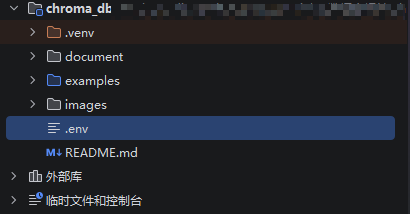
上面代码,使用 load_dotenv() 从项目根目录的 .env 加载 API KEY,不要将 API KEY 写死,避免泄露。.env 文件如下:

到这里搭建一个 RAG 检索服务的准备就完成了:
文档切分(分片)
Chroma 操作工具
检索内容拼接到提示词中
提供 LLM 能力
万事俱备只欠东风,继续吧!!


 川公网安备51010802032098